为 Instagram、TikTok、DALL-E、Midjourney 调整图片尺寸(1024、2048)——免费
把图片调成 AI 生成器的原生尺寸(1024²、2048²、1024×1792)和社交平台预设(Reels 9:16、IG 1:1、X 16:9)。不上传。
Drop image (PNG/JPG/WebP/AVIF)
Up to 50 MB
What the tool looks like
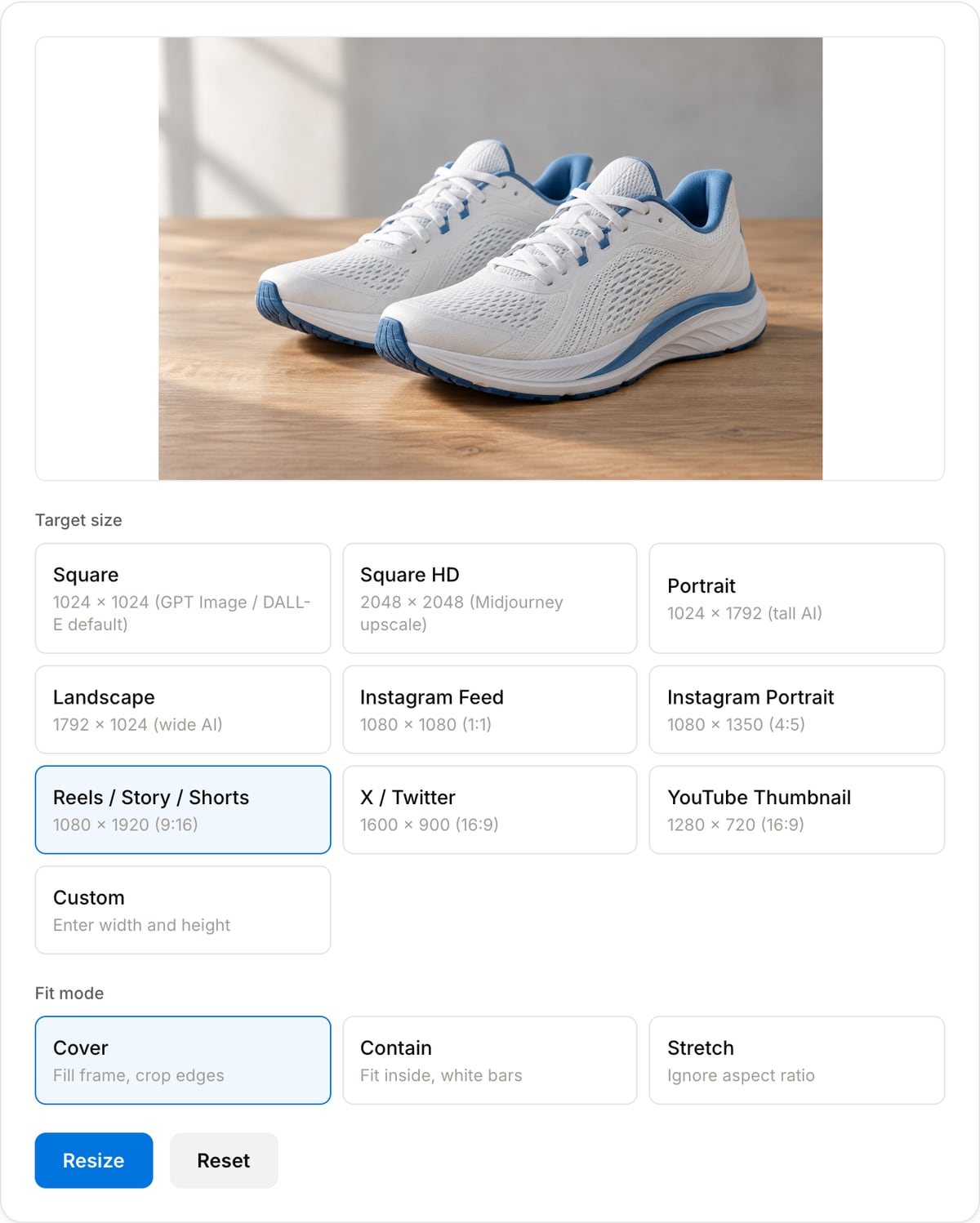
Popular task presets
Best for / not for
Best for
- Exact pixel dimensions for thumbnails, social posts, website assets, ads, avatars, and AI image exports.
- Cover/contain/stretch choices where the frame size matters as much as the image itself.
- Local resizing of client or unreleased images.
Not for
- Upscaling tiny images into truly high-detail artwork.
- Batch resizing large image libraries.
- Cropping complex subjects with object-aware selection.
When to resize an image
- Social feed needs specific dimensions (Reels 1080×1920, IG feed 1080×1080, YouTube thumbnail 1280×720) — preset buttons cover all common platforms.
- AI-generator upscaling — turn a 1024² DALL-E output into 2048² for Midjourney-style prints.
- Stock or print workflow that requires an exact pixel dimension.
Supported formats & limits
| Input formats | PNG, JPG/JPEG, WebP, AVIF, GIF, BMP, HEIC (Safari), TIFF — anything your browser can decode |
|---|---|
| Output formats | PNG (lossless), JPEG (quality 10-100), WebP (quality 10-100), AVIF on Chrome/Edge 122+ and Safari 16.4+ |
| AI-generator native sizes | 1024×1024 (GPT Image / DALL-E square), 1024×1792 (portrait), 1792×1024 (landscape), 2048×2048 (Midjourney upscale) |
| Max file size | Up to 50 MB per image |
| Privacy | Zero uploads — Canvas API runs fully on-device. Open DevTools Network tab to verify. |
| Cost | Free for any use. No signup, no watermark. |
Image Resizer vs. the usual alternatives
| Feature | This tool | VEED (free) | Kapwing (free) | CapCut Online |
|---|---|---|---|---|
| Processing model | Runs locally in your browser | Upload-based project editor | Upload-based project editor | Upload-based online editor |
| File limits | Tool-specific file limits apply; available memory can require smaller files | Free: up to 1 GB per uploaded file | Free: up to 250 MB per uploaded file; exports up to 4 minutes | Limits depend on the feature, account and selected assets |
| Watermark on output | No watermark added | Watermark on free or signed-out exports | Watermark on Free-plan exports | Standard edits can be watermark-free; template branding and Pro assets need checking |
| Signup / account | No account for tools | Workspace/account flow | Workspace/account flow | CapCut account flow |
| Connection | Initial page and processing-engine downloads require internet; offline use is not guaranteed | Online project editor | Online project editor | Online project editor |
| Best for | Private one-step file operations | Full editor, templates, AI tools | Collaboration, templates, AI tools | Social templates and timeline editing |
Comparison covers the web editors and the linked help pages. Plans, export settings and asset restrictions can change; check the source before starting a project.
Checked . Sources: VEED upload limits · VEED watermarks · Kapwing Free plan · CapCut watermarks · CapCut Pro assets
Why resize here
- Built-in presets for the four GPT Image / DALL-E native sizes (1024², 2048², 1024×1792, 1792×1024) — matches what those models actually emit.
- Cover / Contain / Stretch fit modes for controlling how the image maps into the target frame.
- No upload. The image uploader accepts up to 50 MiB; large pixel dimensions can still exceed browser memory.
常见问题
What size should I use for GPT Image 2, DALL-E 3, or Midjourney?
GPT Image 2 / DALL-E 3 default to 1024×1024 square, 1024×1792 portrait, or 1792×1024 landscape. Midjourney v6+ generates 1024×1024 by default and can upscale to 2048×2048. Presets for all four sizes are built in.
What’s the right size for Instagram / Reels / TikTok / YouTube?
Instagram Feed: 1080×1080 (square) or 1080×1350 (4:5 portrait — larger footprint). Reels / TikTok / Shorts: 1080×1920. YouTube Thumbnail: 1280×720. X / Twitter: 1600×900. Presets cover all of these.
Cover vs Contain vs Stretch — which one?
Cover fills the target and crops the edges (best for platform avatars/banners where you want the frame filled). Contain fits the whole image and adds white bars (best for archival / cross-platform). Stretch ignores aspect ratio (use only when you know what you're doing).
Will resizing up make my image blurry?
Scaling a 1024×1024 AI image to 2048×2048 with canvas bilinear blur is the same quality as Photoshop bicubic. For better upscaling (adding detail, not just pixels), use a dedicated AI upscaler — that's not what this tool does.
Does my image upload anywhere?
No. Canvas resize runs in your browser. Open DevTools Network — zero uploads. Safe for private AI renders, client work, NDA content.
What size should I use for a YouTube thumbnail?
Use 1280x720 for a 16:9 thumbnail. Keep text large enough to read after YouTube scales it down.
What is the difference between cover and contain?
Cover fills the target frame and can crop edges. Contain keeps the full image visible and adds empty space if the aspect ratios differ.
Should I resize before compressing?
Yes. Reducing pixel dimensions first usually saves more bytes than lowering JPEG/WebP quality alone.