音频变速变调工具——免费在线(不上传)
调整音频速度(音调不变),或按半音升降音调。支持 MP3/WAV/AAC/OGG/FLAC。
Drop audio file here
文件上限约 2 GB(取决于内存)
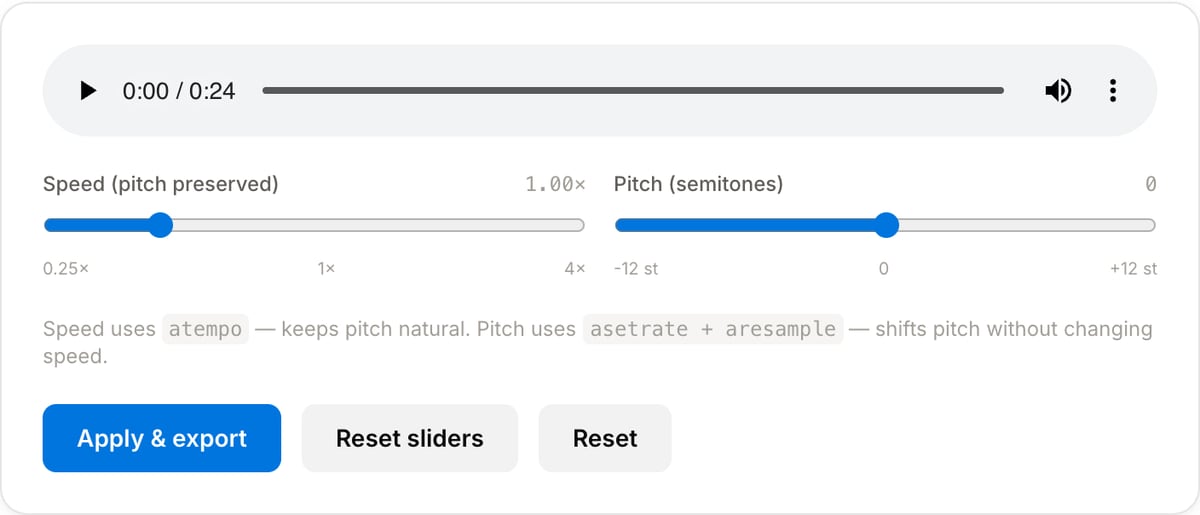
What the tool looks like
Popular task presets
Best for / not for
Best for
- Slowing speech for transcription, language practice, review, and accessibility.
- Speeding up lectures, meetings, podcasts, and voice notes without editing video.
- Pitch shifting samples, practice tracks, and voice effects by semitone steps.
Not for
- Professional time-stretching/mastering where artifacts must be minimized.
- Beat-grid editing, tempo mapping, or DJ set preparation.
- Changing video playback speed. Use Video Speed Changer for video files.
Best use cases for audio speed and pitch
- Slow down a lecture, interview, or language sample while keeping the voice easier to follow.
- Speed up a long meeting or podcast draft for review without touching the video track.
- Shift a music reference, sample, or voice clip up/down in pitch for practice or sound design.
Supported formats & limits
| Input formats | MP3, WAV, AAC/M4A, OGG, FLAC, Opus, WebM — any codec FFmpeg understands |
|---|---|
| Output formats | MP3 (192/320 kbps), AAC (192/256 kbps), WAV (lossless), OGG Vorbis, FLAC (lossless) |
| Max file size | Uploader limit: 2048 MiB (about 2 GB). Processing needs additional memory; smaller files may fail on low-memory devices. |
| Max duration | Depends on file size, the operation and available memory. Long files can fail or take a long time. |
| Cost | Free for any use. No signup. No watermark on output. |
Audio Speed & Pitch Changer vs. the usual alternatives
| Feature | This tool | VEED (free) | Kapwing (free) | CapCut Online |
|---|---|---|---|---|
| Processing model | Runs locally in your browser | Upload-based project editor | Upload-based project editor | Upload-based online editor |
| File limits | Tool-specific file limits apply; available memory can require smaller files | Free: up to 1 GB per uploaded file | Free: up to 250 MB per uploaded file; exports up to 4 minutes | Limits depend on the feature, account and selected assets |
| Watermark on output | No watermark added | Watermark on free or signed-out exports | Watermark on Free-plan exports | Standard edits can be watermark-free; template branding and Pro assets need checking |
| Signup / account | No account for tools | Workspace/account flow | Workspace/account flow | CapCut account flow |
| Connection | Initial page and processing-engine downloads require internet; offline use is not guaranteed | Online project editor | Online project editor | Online project editor |
| Best for | Private one-step file operations | Full editor, templates, AI tools | Collaboration, templates, AI tools | Social templates and timeline editing |
Comparison covers the web editors and the linked help pages. Plans, export settings and asset restrictions can change; check the source before starting a project.
Checked . Sources: VEED upload limits · VEED watermarks · Kapwing Free plan · CapCut watermarks · CapCut Pro assets
Why this speed and pitch tool is different
- Speed and pitch are separate controls, because transcription and music-practice tasks need different behavior.
- The workflow is local, useful for private lessons, interviews, and unreleased samples.
- Pairs with trimming and normalization so the processed clip is ready to share.
Tutorials covering this tool
常见问题
What is the difference between speed and pitch?
Speed changes how fast the audio plays; pitch changes how high or low it sounds. Traditional “speed up” also raises pitch (like a tape played faster). This tool separates them so you can change one without affecting the other.
How does it preserve pitch while speeding up?
FFmpeg’s atempo filter time-stretches the waveform using phase-vocoder algorithms — keeping frequencies intact while packing or stretching the duration. Best quality stays within 0.5×-2.0× per filter; outside that range we chain atempo.
Why 12 semitones max?
12 semitones is one octave — either doubling or halving the pitch. Beyond that, pitch-shift artifacts become too severe to be useful.
Can I change speed without changing pitch?
Yes. Use speed adjustment with pitch preservation for speech review, lectures, and transcription.
Can pitch shifting create artifacts?
Yes, especially at large semitone changes. Smaller shifts sound more natural.
Should I normalize after changing speed?
Often yes. Speed or pitch processing can change perceived loudness, so normalize the final clip if needed.