铃声制作——iPhone 用 M4R,安卓用 MP3
从任意歌曲或视频里剪出一段铃声,加上淡入淡出,导出成你手机认的格式。什么都不会上传。
Drop a song or video here, or click to browse
MP3, WAV, M4A, FLAC · MP4, MOV, WebM
使用方法
Drop in a song or video
Any common audio format works, and so does the audio inside a video file.
Choose the phone and the part
Pick iPhone or Android, then set where the ringtone starts and how long it runs.
Export and install
Download the M4R or MP3 and copy it to your phone using the steps in the questions below.
What the tool looks like
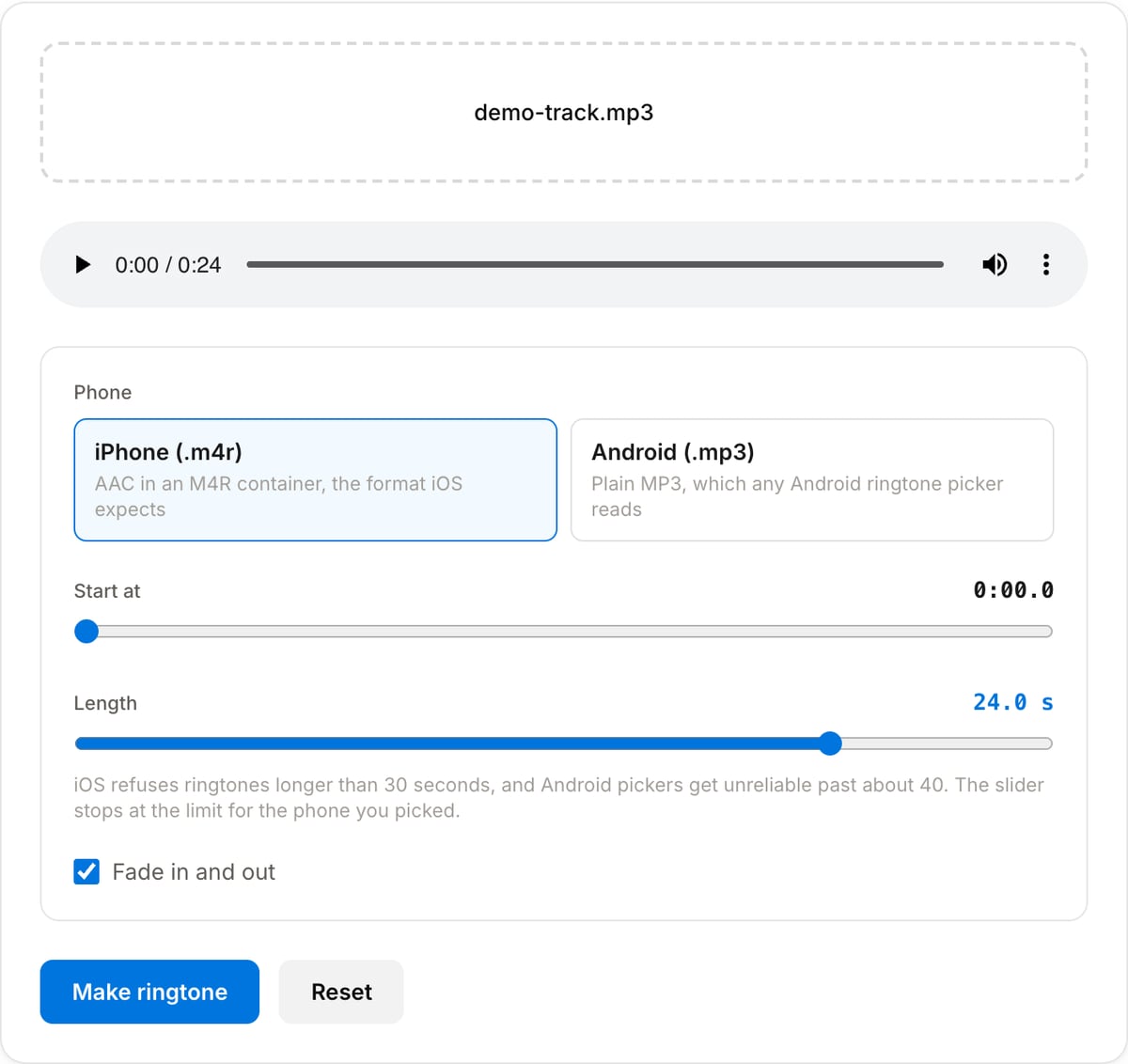
Popular task presets
Best for / not for
Best for
- Cutting a hook out of a song you already own and putting it on your own phone.
- Making an alarm or notification tone from a specific few seconds.
- Getting the .m4r container iOS expects, which a plain MP3 export will not give you.
Not for
- Distributing ringtones made from music you do not have the rights to.
- Installing the tone for you — that step happens on the phone, through iTunes/Finder or a file manager.
- Fading between two songs or layering sounds.
When to make a ringtone
- Cutting the recognisable few seconds out of a song rather than starting the ringtone on an intro nobody will hear.
- Making an alarm from something that will actually wake you, without paying for a tone pack.
- Building a short notification tone from a sound effect or a voice clip.
- Getting the right container for the phone: iOS will not accept an MP3 as a ringtone no matter how it is named.
Supported formats & limits
| Input containers | MP4, MOV, WebM, MKV, AVI, FLV, WMV, M4V |
|---|---|
| Input codecs | H.264, H.265, VP8, VP9, MPEG-4, MJPEG. Not AV1 — this WebAssembly build has no software AV1 decoder. |
| Output container | MP4 (default) — interoperable with iOS, Android, YouTube, Instagram, X |
| Output codec | H.264 video + AAC audio |
| Max file size | Uploader limit: 2048 MiB (about 2 GB). Processing needs additional memory; smaller files may fail on low-memory devices. |
| Max duration | Depends on file size, the operation and available memory. Long files can fail or take a long time. |
| Cost | Free for any use. No signup. No watermark. |
Ringtone Maker vs. the usual alternatives
| Feature | This tool | VEED (free) | Kapwing (free) | CapCut Online |
|---|---|---|---|---|
| Processing model | Runs locally in your browser | Upload-based project editor | Upload-based project editor | Upload-based online editor |
| File limits | Tool-specific file limits apply; available memory can require smaller files | Free: up to 1 GB per uploaded file | Free: up to 250 MB per uploaded file; exports up to 4 minutes | Limits depend on the feature, account and selected assets |
| Watermark on output | No watermark added | Watermark on free or signed-out exports | Watermark on Free-plan exports | Standard edits can be watermark-free; template branding and Pro assets need checking |
| Signup / account | No account for tools | Workspace/account flow | Workspace/account flow | CapCut account flow |
| Connection | Initial page and processing-engine downloads require internet; offline use is not guaranteed | Online project editor | Online project editor | Online project editor |
| Best for | Private one-step file operations | Full editor, templates, AI tools | Collaboration, templates, AI tools | Social templates and timeline editing |
Comparison covers the web editors and the linked help pages. Plans, export settings and asset restrictions can change; check the source before starting a project.
Checked . Sources: VEED upload limits · VEED watermarks · Kapwing Free plan · CapCut watermarks · CapCut Pro assets
Why use this ringtone maker
- The right format for each phone, including the .m4r container iOS requires — renaming an MP3 does not work.
- Length limits are enforced for you: 30 seconds for iPhone, 40 for Android, which is where most homemade ringtones fail.
- Fade in and out, so the tone does not start on a hard transient or cut off mid-note when the call is answered.
- No upload, no account, no watermark — and your music library stays on your own machine.
常见问题
What is an M4R file?
It is an ordinary AAC audio track in an MP4 container with the extension changed to .m4r, which is the only thing that marks it as a ringtone to iOS. That is why renaming an M4A to M4R often works, and why this tool writes the container properly rather than just relabelling the file.
How do I get the ringtone onto my iPhone?
Connect the phone to a computer and open it in Finder on macOS or the Apple Devices app on Windows, then drag the .m4r file onto the device. It appears under Settings, Sounds and Haptics, Ringtone. iOS does not let a browser install a ringtone directly, which is a restriction of the phone rather than of this tool.
And on Android?
Choose the Android option to get an MP3, then copy it into the Ringtones folder in your phone storage. Most launchers also let you pick any audio file straight from Settings, Sound, Phone ringtone, Add ringtone.
Why is the length capped at 30 seconds?
iOS refuses to install a ringtone longer than 30 seconds, so the slider stops there for the iPhone format. Android is more relaxed but ringtone pickers get unreliable past about 40 seconds, which is where the MP3 option stops.
Should I use the fade?
Usually yes. A ringtone cut out of the middle of a song starts and ends mid-note, which sounds abrupt when the phone rings. The fade is kept short, a fraction of the clip length, so it softens the edges without eating into the hook.
Does my music upload anywhere?
No. The cut, the fade and the encode all happen through FFmpeg WebAssembly in this tab. The file never leaves your device and no account is needed.
How do I get the file onto my iPhone?
Connect the phone and drag the .m4r into Finder (or iTunes on Windows), then pick it under Settings, Sounds. The file has to be .m4r; iOS ignores MP3s offered as ringtones.
Why is there a length limit?
iOS rejects ringtones over 30 seconds outright. Android is more forgiving but most pickers expect something short, so 40 seconds is the cap here.