Jump Cut Maker — Tighten Talking-Head Video
Auto-detect every pause in your vlog, podcast, or screencast and apply jump cuts in one click. Vlog-tuned defaults, runs in your browser, no upload.
Drag & drop your video here, or click to browse
Max file size: ~2 GB (memory permitting)
How to Use — Jump Cut Maker — Tighten Talking-Head Video
Upload your video
Drag and drop a talking-head clip. The file stays on your device.
Pick a preset
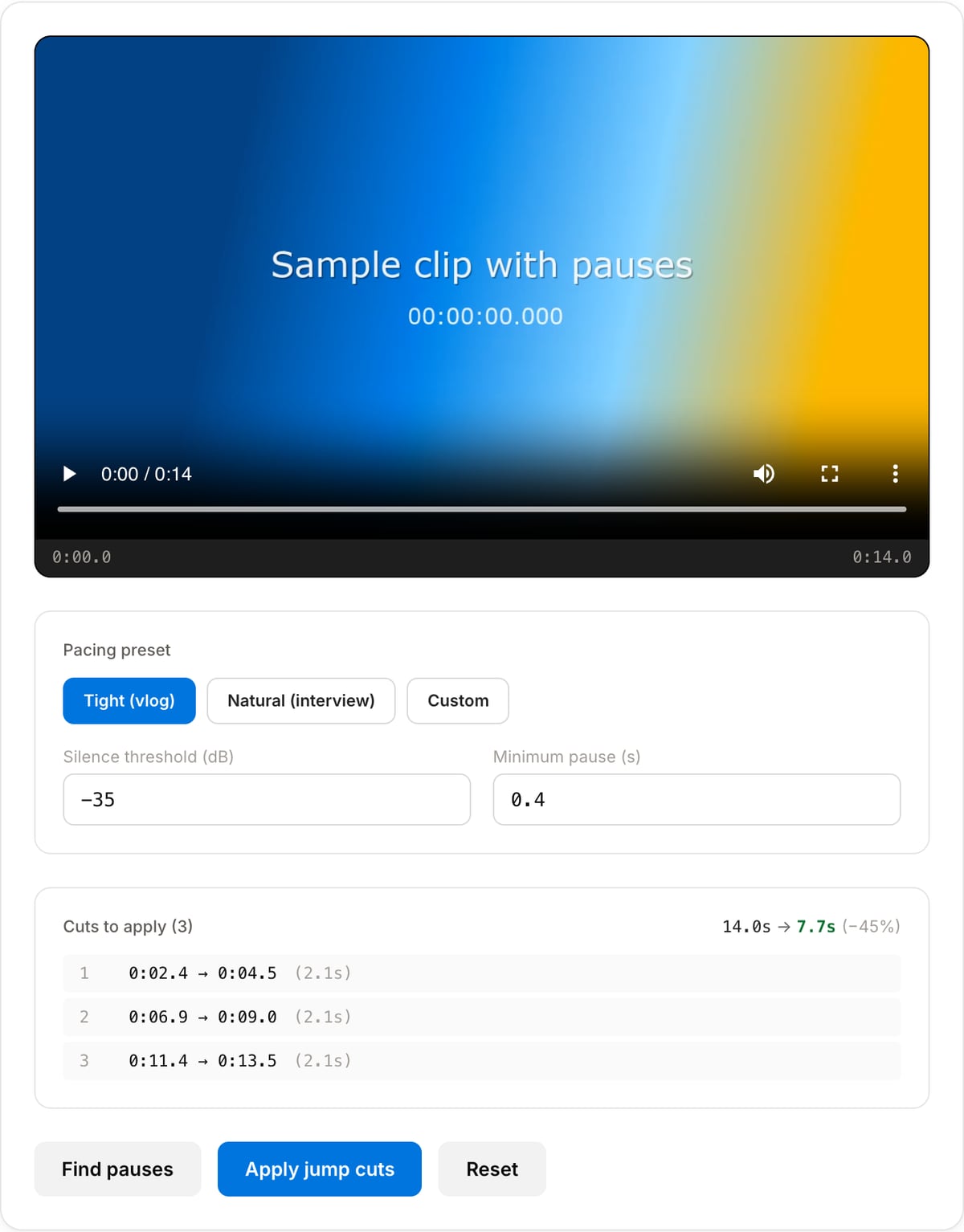
Tight (vlog) for fast pacing, Natural (interview) for fewer cuts, or Custom for full control over threshold and minimum pause.
Find pauses
Click "Find pauses" — the tool runs FFmpeg silencedetect and shows you every cut it would make, plus how much shorter the result will be.
Apply jump cuts
Click "Apply jump cuts". Non-pause segments are stitched together in order. Download the tightened video.
What the tool looks like
Popular task presets
Best for / not for
Best for
- Talking-head videos, tutorials, vlogs, screen recordings, lessons, and interviews with long pauses.
- One-shot tightening before manual editing or publishing.
- Creators who want a Descript-style silence cut without uploading raw footage.
Not for
- Music videos, performances, or cinematic edits where silence and pacing are intentional.
- Transcript-aware editing that removes specific filler words or sentences.
- Multi-camera edits, B-roll timing, or timeline-level storytelling.
When to use the Jump Cut Maker
- Tightening a YouTube vlog or talking-head — remove pauses and filler so the energy stays up.
- Cleaning up a tutorial or screencast — cut the dead air between thoughts without manually scrubbing the timeline.
- Trimming a video podcast or interview before publishing — shorter runtime, higher retention, no cloud upload of raw footage.
- Repurposing long-form content into a short — find the talking parts, cut everything else.
Supported formats & limits
| Input containers | MP4, MOV, WebM, MKV, AVI, FLV, WMV, M4V |
|---|---|
| Input codecs | H.264, H.265, VP8, VP9, MPEG-4, MJPEG. Not AV1 — this WebAssembly build has no software AV1 decoder. |
| Output container | MP4 (default) — interoperable with iOS, Android, YouTube, Instagram, X |
| Output codec | H.264 video + AAC audio |
| Max file size | Up to ~2 GB (limited by browser memory) |
| Max duration | No hard limit — depends on file size |
| Cost | Free for any use. No signup. No watermark. |
Jump Cut Maker vs. the usual alternatives
| Feature | This tool | Descript (free tier) | CapCut Online | Premiere Auto Edit |
|---|---|---|---|---|
| Processing model | Runs locally in your browser | Cloud upload, 1 hour/month free | Cloud upload | Local desktop app |
| Cost | Free, unlimited | $12-24/month for unlimited | Free with watermark on some templates | $22.99/month subscription |
| Setup time | Open a tab | Sign up, upload, transcribe, edit | Sign up, upload | Install Premiere Pro |
| Best for | One-shot tightening of a single clip | Transcript-based editing of long-form podcasts | Mobile-style social edits | Multi-track project edits |
| Watermark | Never | Free tier adds watermark | On some exports | No (paid product) |
Descript and CapCut plan limits were checked on April 30, 2026 and can change.
Why use this jump cut maker
- Vlog-tuned defaults — −35 dB threshold and 0.4 s minimum pause work out of the box for talking-head content. Pick "Natural" for interviews where pauses matter.
- Shows the final length before you commit — you see exactly how many cuts will be made and how much shorter the video becomes.
- No subscription. Descript and similar tools cost $12+/month for what amounts to the same FFmpeg pipeline you get here for free.
- 100% private — detection and cutting run in your browser via WebAssembly. Your raw footage never leaves the device.
Task-focused FAQ
Is this the same as Silence Remover?
It uses the same idea but is tuned for video jump cuts. Silence Remover is better for audio-only cleanup.
What settings should I use for a talking-head video?
Start with the default threshold and minimum pause. Use a gentler setting for interviews where natural pauses matter.
Will it remove ums and filler words?
Only if they fall inside detected silent sections. It does not understand words like a transcript editor.
Tutorials covering this tool
Frequently Asked Questions
What is a jump cut?
A jump cut removes a chunk of time from a continuous shot, making the subject "jump" forward. Vloggers use it to delete pauses and filler words. This tool automates the cutting by detecting silences and concatenating the remaining clips.
How is this different from the Silence Remover?
Same engine, different defaults. Silence Remover is tuned for podcasts (-30 dB, 0.5 s). Jump Cut Maker is tuned for talking-head video (-35 dB, 0.4 s) with vlog-friendly presets and a final-duration summary.
Which preset should I use?
Tight (vlog) for YouTube talking-heads, tutorials, tech reviews. Natural (interview) for podcasts and documentaries where intentional pauses matter. Custom if you want to fine-tune dB threshold and minimum pause yourself.
Will the cuts look jarring?
Most YouTube content has visible jump cuts every 2-3 seconds — viewers expect them. For invisibility, use the Natural preset or follow up with a B-roll cutaway. Background music also masks the audio jump.
Is my video uploaded anywhere?
No. Detection and cutting run in your browser via WebAssembly. Open DevTools Network tab — you will see zero uploads during processing.