Remove Silence from Video Online Free
Automatically detect and remove silent parts from your video. Speed up your content by cutting dead air — essential for YouTubers, podcasters, and educators.
Drag & drop your video here, or click to browse
Max file size: ~2 GB (memory permitting)
How to Use — Remove Silence from Video Online Free
Upload your video
Drag and drop any video file (MP4, WebM, MOV, AVI) or click to browse. The file stays local on your device.
Adjust detection settings
Set the silence threshold (dB level below which audio counts as silence) and minimum duration. Defaults work for most content.
Remove silence and download
Click "Remove Silence" to detect and cut silent parts. Remaining clips are joined seamlessly. Download the tightened video.
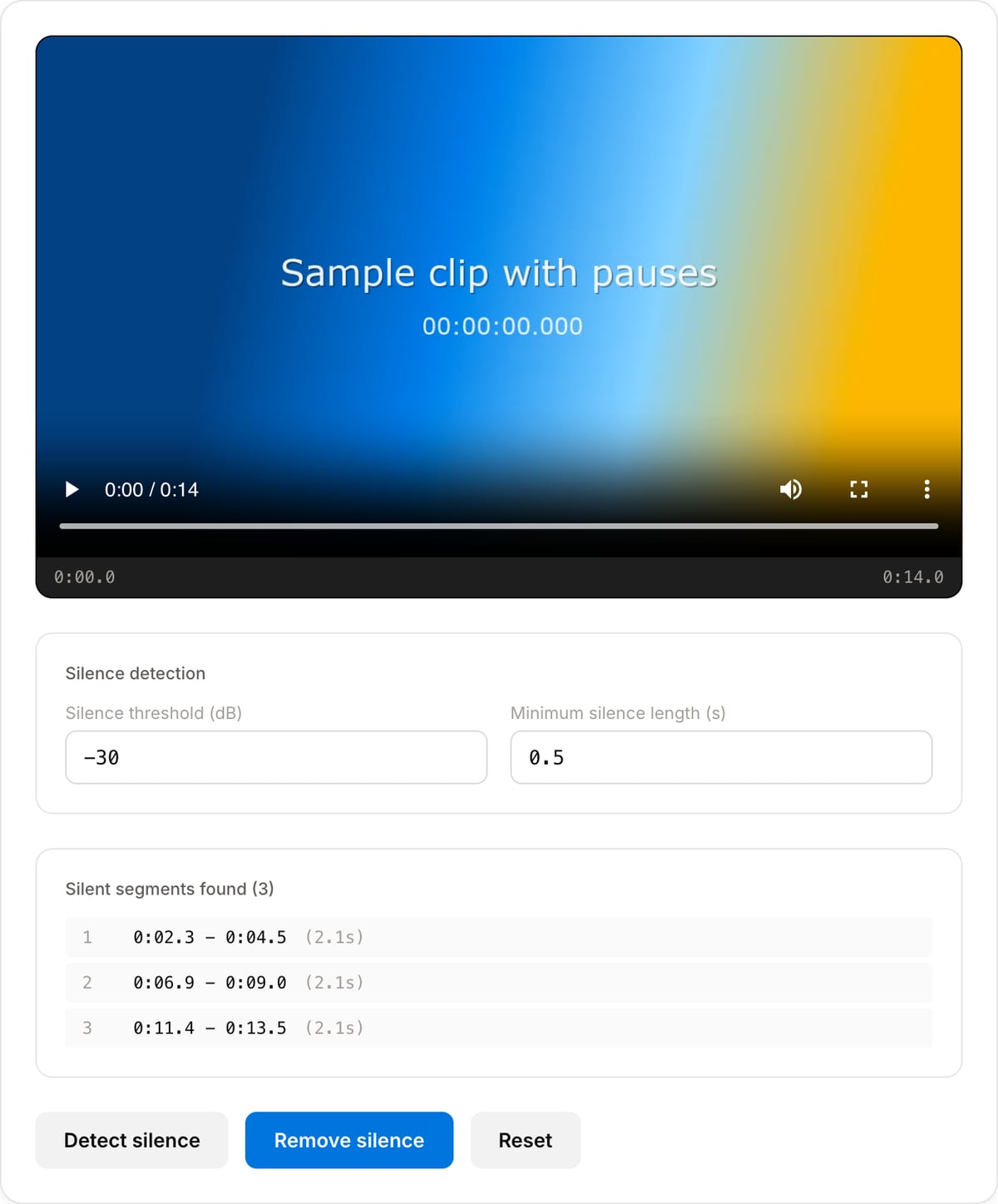
What the tool looks like
Popular task presets
Best for / not for
Best for
- Removing dead air from meetings, lectures, podcasts, interviews, webinars, and voice notes.
- Shortening speech-heavy audio without manually scrubbing the waveform.
- Preparing cleaner audio before transcription, publishing, or sharing.
Not for
- Music editing where quiet passages are intentional.
- Removing filler words while keeping natural pauses; transcript editing is better for that.
- Perfect conversational pacing without review. Automatic cuts can feel too tight if thresholds are aggressive.
Best use cases for silence removal
- Shorten Zoom, Meet, Teams, webinar, lecture, and training recordings by cutting long pauses.
- Tighten podcast or interview audio before sending it to transcription or publishing.
- Remove dead air from voice notes, narration, screen recordings, and course audio.
Supported formats & limits
| Input containers | MP4, MOV, WebM, MKV, AVI, FLV, WMV, M4V |
|---|---|
| Input codecs | H.264, H.265, VP8, VP9, MPEG-4, MJPEG. Not AV1 — this WebAssembly build has no software AV1 decoder. |
| Output container | MP4 (default) — interoperable with iOS, Android, YouTube, Instagram, X |
| Output codec | H.264 video + AAC audio |
| Max file size | Up to ~2 GB (limited by browser memory) |
| Max duration | No hard limit — depends on file size |
| Cost | Free for any use. No signup. No watermark. |
Silence Remover vs. the usual alternatives
| Feature | This tool | VEED (free) | Kapwing (free) | CapCut Online |
|---|---|---|---|---|
| Processing model | Runs locally in your browser | Upload-based project editor | Upload-based project editor | Upload-based online editor |
| File limits | No upload cap; practical limit is browser memory | Plan-specific upload limits | Plan-specific upload and export limits | Feature- and account-specific limits |
| Watermark on output | No watermark added | Free exports include a VEED watermark | Free exports include a Kapwing watermark | Standard edits can be watermark-free; templates/assets may add branding |
| Signup / account | No account for tools | Workspace/account flow | Workspace/account flow | CapCut account flow |
| Works offline | Yes after cache, subject to browser support | No | No | No |
| Best for | Private one-step file operations | Full editor, templates, AI tools | Collaboration, templates, AI tools | Social templates and timeline editing |
Vendor plan limits were checked on April 29, 2026 and can change by region, account state, and export option. Verify critical limits on the vendor pricing/help page before relying on them.
Why this silence remover is different
- Threshold and minimum-silence controls are visible, so you can tune natural conversation versus aggressive cleanup.
- Shows the expected cut result before export, helping avoid over-tight edits.
- Local processing is useful for meetings, interviews, and classes that should not be uploaded.
Task-focused FAQ
What threshold should I start with?
Start around -35 dB for typical spoken recordings, then adjust based on room noise and microphone level.
Will it remove filler words?
No. It detects quiet sections, not words. Use Jump Cut Maker for video pacing or a transcript editor for filler-word removal.
Can silence removal make speech feel unnatural?
Yes if cuts are too aggressive. Increase the minimum silence duration or keep a little padding around pauses.
Tutorials covering this tool
Frequently Asked Questions
How does silence detection work?
It analyzes the audio waveform for segments below a dB threshold for a minimum duration. Those segments are cut and remaining clips are concatenated using FFmpeg silencedetect filter.
How do I set the right threshold?
-30 dB catches only true silence (studio recordings). -35 to -40 dB catches quiet ambient noise too (outdoor/vlog). Start with the default and adjust if too much or too little is removed.
What about intentional pauses?
A minimum silence duration setting (typically 0.5-1.0s) preserves brief natural speech pauses. Very short pauses are kept. Adjust the minimum duration to match your content style.
Better for podcasts or vlogs?
Both — with different settings. Podcasts benefit from aggressive removal (dead air adds nothing). Vlogs need gentler settings since visual context may justify pauses.