Bass Booster — Boost the Bass of Any Song Online
Add up to +20 dB of low end to any song or video. A built-in limiter keeps it from clipping, and the original format is preserved.
Drag & drop your video here, or click to browse
MP3, WAV, M4A, FLAC · MP4, MOV, WebM
How to Use — Bass Booster — Boost the Bass of Any Song Online
Upload the song or video
MP3, WAV, M4A, FLAC or a video file. It stays on your device — the boost runs on FFmpeg WebAssembly in the browser.
Choose the amount
Light (+6 dB) thickens thin phone recordings, Medium (+10 dB) is the classic "bass boosted" sound, Heavy and Extreme are for car-audio and meme edits. Keep the limiter on to avoid distortion.
Boost and download
Preview the result, then download in the same format you uploaded. Videos keep their picture untouched.
What the tool looks like
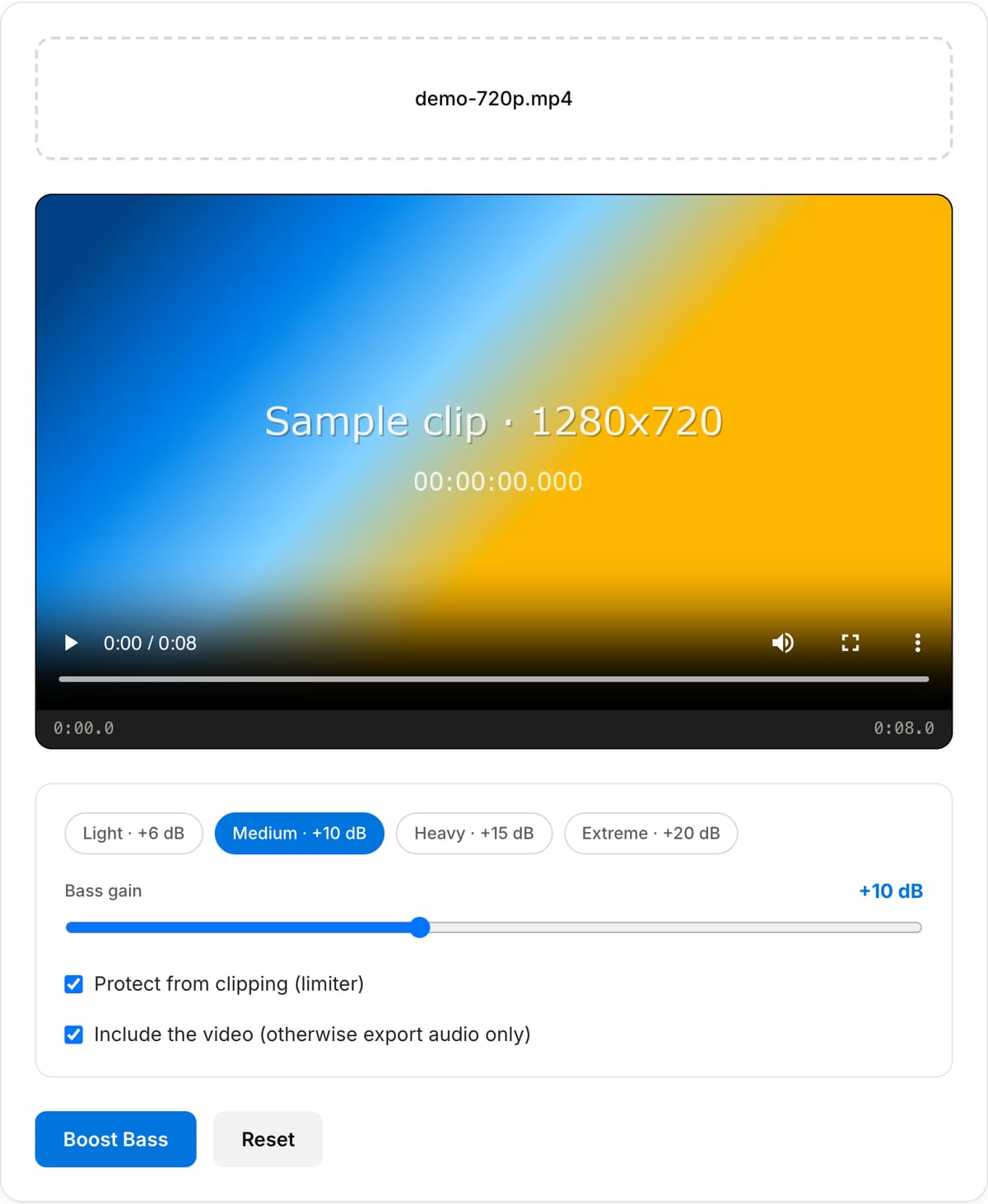
Best use cases for the bass booster
- Give thin phone or laptop recordings the low end they lost.
- Prepare car-audio and party playlists where the system can take the extra weight.
- Make a "bass boosted" remix for a YouTube or TikTok upload.
- Thicken a voiceover or podcast voice that sounds tinny after noise reduction.
Supported formats & limits
| Audio input | MP3, WAV, AAC/M4A, OGG, FLAC, Opus — output keeps the format (WAV/FLAC stay lossless) |
|---|---|
| Video input | MP4, MOV, WebM, MKV — picture stream-copied, audio re-encoded; or export audio only as MP3 |
| Boost | Low shelf at 110 Hz, +3 to +20 dB; pre-gain and brick-wall limiter (0.97) when clipping protection is on |
| Max file size | Up to ~2 GB (limited by browser memory) |
| Cost | Free for any use. No signup. No watermark. |
Bass Booster vs. the usual alternatives
| Feature | This tool | VEED (free) | Kapwing (free) | CapCut Online |
|---|---|---|---|---|
| Processing model | Runs locally in your browser | Upload-based project editor | Upload-based project editor | Upload-based online editor |
| File limits | No upload cap; practical limit is browser memory | Plan-specific upload limits | Plan-specific upload and export limits | Feature- and account-specific limits |
| Watermark on output | No watermark added | Free exports include a VEED watermark | Free exports include a Kapwing watermark | Standard edits can be watermark-free; templates/assets may add branding |
| Signup / account | No account for tools | Workspace/account flow | Workspace/account flow | CapCut account flow |
| Works offline | Yes after cache, subject to browser support | No | No | No |
| Best for | Private one-step file operations | Full editor, templates, AI tools | Collaboration, templates, AI tools | Social templates and timeline editing |
Vendor plan limits were checked on April 29, 2026 and can change by region, account state, and export option. Verify critical limits on the vendor pricing/help page before relying on them.
Why this bass booster is different
- Runs entirely in your browser on FFmpeg WebAssembly — no upload, no queue, no size cap.
- A real limiter, not just gain: boosted tracks stay clean instead of clipping into distortion.
- Works on videos too, copying the picture untouched.
- Same format in, same format out — no surprise conversion to a low-bitrate MP3.
Frequently Asked Questions
Will boosting the bass make my track clip or distort?
It can, which is why the limiter is on by default: the level is dropped slightly before the shelf boost and a brick-wall limiter at −0.3 dBFS catches any peaks. Turn it off only if you want the crunchy, deliberately overdriven "extreme bass boosted" sound.
What frequencies are boosted?
A low shelf centred at 110 Hz with a wide slope, so kick drums and bass lines gain weight without turning the whole mix muddy. That is the same curve most phone EQ "bass boost" presets use, just with more range.
Does it work on YouTube or TikTok videos?
Yes — upload the video file and the tool boosts its audio track while copying the video stream unchanged. Download it as an MP4 ready to re-upload.
Is the output quality lower than the original?
WAV and FLAC stay lossless. MP3 and M4A are re-encoded at 192 kbps, which is transparent for a bass-boosted listen; if you need bit-perfect, convert to WAV first, boost, then convert back.