Nightcore Maker — Speed Up & Pitch Up Any Song Online
Turn any track or video into a nightcore or sped-up edit: faster tempo, higher pitch, brighter treble. Video stays in sync.
Drag & drop your video here, or click to browse
MP3, WAV, M4A, FLAC · MP4, MOV, WebM
How to Use — Nightcore Maker — Speed Up & Pitch Up Any Song Online
Upload the track
MP3, WAV, M4A, FLAC or a video file. Nothing is uploaded — the resampling runs on FFmpeg WebAssembly in your browser.
Choose the speed
1.25× is classic nightcore; 1.15× is a gentle "sped up" TikTok edit, 1.35× is hyper. Pitch rises with speed, and the treble lift keeps vocals bright.
Render and download
Preview in the page, then download. Videos are re-timed to match so the clip stays in sync with the faster audio.
What the tool looks like
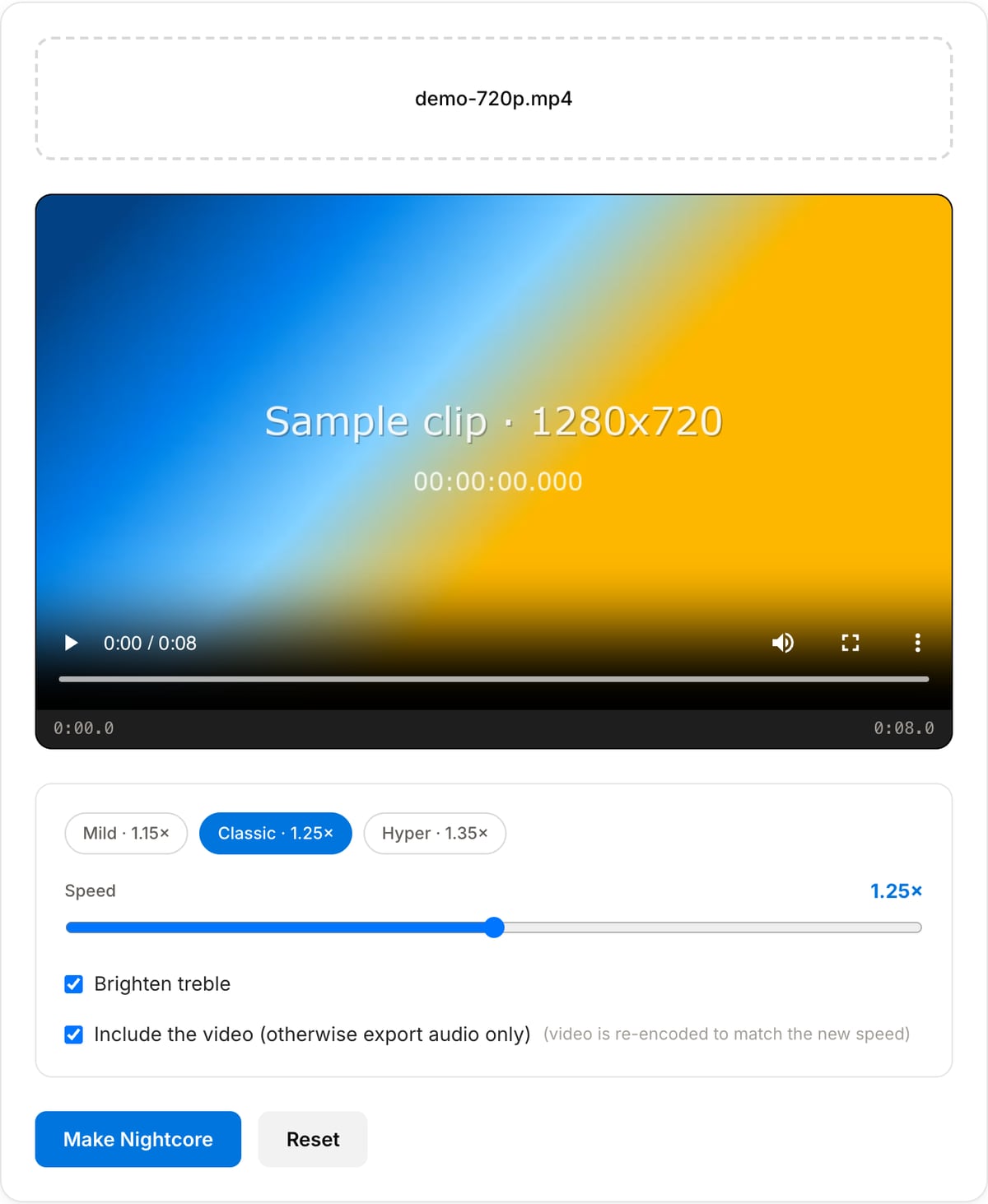
Best use cases for the nightcore maker
- Create a nightcore or "sped up" version of a track for YouTube, TikTok or a Reel.
- Speed up a video and its soundtrack together for a fast-paced montage.
- Pitch a vocal sample up for a hyperpop or drum-and-bass edit.
- Preview how a song feels at a higher tempo before remixing it.
Supported formats & limits
| Audio input | MP3, WAV, AAC/M4A, OGG, FLAC, Opus — output keeps the format |
|---|---|
| Video input | MP4, MOV, WebM, MKV — picture re-timed and re-encoded to H.264 MP4; or audio only as MP3 |
| Speed | 1.10×–1.40× via resampling (pitch rises with tempo); optional +3 dB treble shelf; output limiter |
| Max file size | Up to ~2 GB (limited by browser memory) |
| Cost | Free for any use. No signup. No watermark. |
Nightcore Maker vs. the usual alternatives
| Feature | This tool | VEED (free) | Kapwing (free) | CapCut Online |
|---|---|---|---|---|
| Processing model | Runs locally in your browser | Upload-based project editor | Upload-based project editor | Upload-based online editor |
| File limits | No upload cap; practical limit is browser memory | Plan-specific upload limits | Plan-specific upload and export limits | Feature- and account-specific limits |
| Watermark on output | No watermark added | Free exports include a VEED watermark | Free exports include a Kapwing watermark | Standard edits can be watermark-free; templates/assets may add branding |
| Signup / account | No account for tools | Workspace/account flow | Workspace/account flow | CapCut account flow |
| Works offline | Yes after cache, subject to browser support | No | No | No |
| Best for | Private one-step file operations | Full editor, templates, AI tools | Collaboration, templates, AI tools | Social templates and timeline editing |
Vendor plan limits were checked on April 29, 2026 and can change by region, account state, and export option. Verify critical limits on the vendor pricing/help page before relying on them.
Why this nightcore maker is different
- True resampling for the classic nightcore sound, plus the treble lift that keeps vocals bright.
- Videos are sped up with the audio and re-encoded in sync — one download, ready to post.
- Everything runs in your browser on FFmpeg WebAssembly; nothing is uploaded and there is no file cap.
- Free, no watermark, no account.
Tutorials covering this tool
Frequently Asked Questions
What is the difference between nightcore and a "sped up" edit?
Mostly degree. Sped-up edits on TikTok usually run 1.10–1.20× with the pitch rising along with the tempo; nightcore is the same idea pushed to 1.25–1.35× with brighter EQ. Both come from resampling, which is what this tool does.
Can I speed the song up without changing the pitch?
Not here — nightcore is defined by the pitch going up. For tempo-only changes (podcasts, practice loops) use the Audio Speed & Pitch tool, which uses a time-stretch algorithm that preserves pitch.
Why does the treble toggle exist?
Resampling shifts everything up, but vocals in a sped-up track can still sound slightly buried. A +3 dB high shelf adds the sparkle that classic nightcore uploads have. Turn it off for tracks that are already bright.
Does it work on a video?
Yes. Keep "include the video" enabled and the picture is sped up by the same factor and re-encoded to MP4 so it stays in sync. Disable it to get just the nightcore audio as an MP3.