Audio Speed & Pitch Changer — Free Online (No Upload)
Adjust audio speed (preserve pitch) or shift pitch in semitones. MP3/WAV/AAC/OGG/FLAC supported.
Drop audio file here
Max file size: ~2 GB (memory permitting)
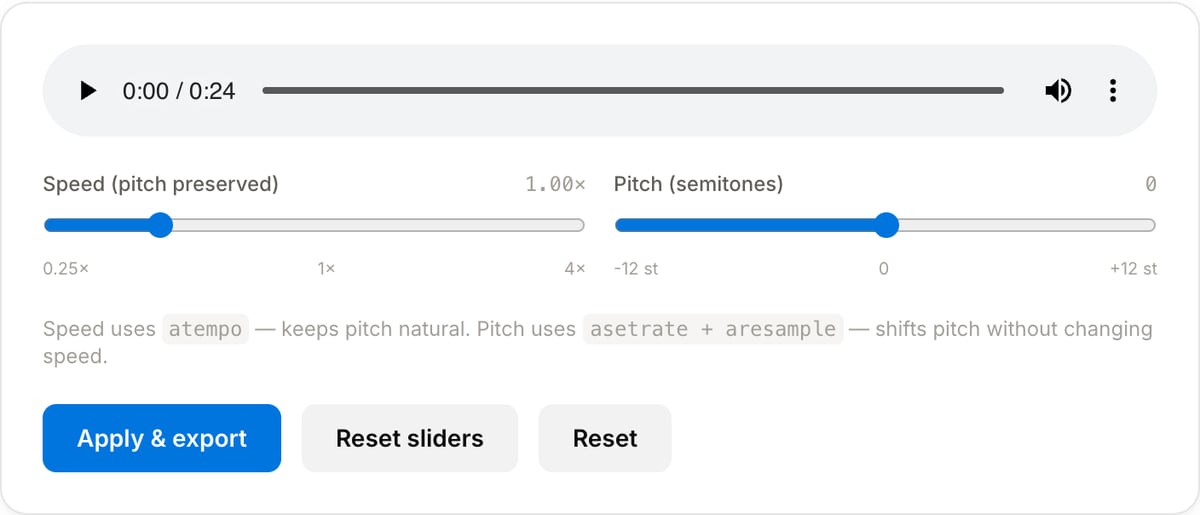
What the tool looks like
Popular task presets
Best for / not for
Best for
- Slowing speech for transcription, language practice, review, and accessibility.
- Speeding up lectures, meetings, podcasts, and voice notes without editing video.
- Pitch shifting samples, practice tracks, and voice effects by semitone steps.
Not for
- Professional time-stretching/mastering where artifacts must be minimized.
- Beat-grid editing, tempo mapping, or DJ set preparation.
- Changing video playback speed. Use Video Speed Changer for video files.
Best use cases for audio speed and pitch
- Slow down a lecture, interview, or language sample while keeping the voice easier to follow.
- Speed up a long meeting or podcast draft for review without touching the video track.
- Shift a music reference, sample, or voice clip up/down in pitch for practice or sound design.
Supported formats & limits
| Input formats | MP3, WAV, AAC/M4A, OGG, FLAC, Opus, WebM — any codec FFmpeg understands |
|---|---|
| Output formats | MP3 (192/320 kbps), AAC (192/256 kbps), WAV (lossless), OGG Vorbis, FLAC (lossless) |
| Max file size | Up to ~2 GB (limited by browser memory) |
| Max duration | No hard limit — multi-hour files work fine |
| Cost | Free for any use. No signup. No watermark on output. |
Audio Speed & Pitch Changer vs. the usual alternatives
| Feature | This tool | VEED (free) | Kapwing (free) | CapCut Online |
|---|---|---|---|---|
| Processing model | Runs locally in your browser | Upload-based project editor | Upload-based project editor | Upload-based online editor |
| File limits | No upload cap; practical limit is browser memory | Plan-specific upload limits | Plan-specific upload and export limits | Feature- and account-specific limits |
| Watermark on output | No watermark added | Free exports include a VEED watermark | Free exports include a Kapwing watermark | Standard edits can be watermark-free; templates/assets may add branding |
| Signup / account | No account for tools | Workspace/account flow | Workspace/account flow | CapCut account flow |
| Works offline | Yes after cache, subject to browser support | No | No | No |
| Best for | Private one-step file operations | Full editor, templates, AI tools | Collaboration, templates, AI tools | Social templates and timeline editing |
Vendor plan limits were checked on April 29, 2026 and can change by region, account state, and export option. Verify critical limits on the vendor pricing/help page before relying on them.
Why this speed and pitch tool is different
- Speed and pitch are separate controls, because transcription and music-practice tasks need different behavior.
- The workflow is local, useful for private lessons, interviews, and unreleased samples.
- Pairs with trimming and normalization so the processed clip is ready to share.
Task-focused FAQ
Can I change speed without changing pitch?
Yes. Use speed adjustment with pitch preservation for speech review, lectures, and transcription.
Can pitch shifting create artifacts?
Yes, especially at large semitone changes. Smaller shifts sound more natural.
Should I normalize after changing speed?
Often yes. Speed or pitch processing can change perceived loudness, so normalize the final clip if needed.
Tutorials covering this tool
Frequently Asked Questions
What is the difference between speed and pitch?
Speed changes how fast the audio plays; pitch changes how high or low it sounds. Traditional “speed up” also raises pitch (like a tape played faster). This tool separates them so you can change one without affecting the other.
How does it preserve pitch while speeding up?
FFmpeg’s atempo filter time-stretches the waveform using phase-vocoder algorithms — keeping frequencies intact while packing or stretching the duration. Best quality stays within 0.5×-2.0× per filter; outside that range we chain atempo.
Why 12 semitones max?
12 semitones is one octave — either doubling or halving the pitch. Beyond that, pitch-shift artifacts become too severe to be useful.