How Much Did Compression Cost You?
Measure a compressed file against its original with SSIM and PSNR, and get a number instead of an argument about whether it looks worse.
Drag & drop your video here, or click to browse
Max file size: ~2 GB (memory permitting)
How to Use — How Much Did Compression Cost You?
Load the original, then the re-encoded copy
The original is the file you are comparing against; the second is the compressed or exported copy you want judged. Both stay on your device — the comparison runs in the browser tab.
Pick the seconds to score
Two, five or ten seconds, starting anywhere inside the shorter file. Scoring the opening of a clip that fades up from black flatters any encode, so move the start into a busy shot.
Read the verdict, not just the number
SSIM and PSNR are measured in two passes and reported with the worst frame in the window, a plain-language verdict for the score, and the size the encode actually bought you. There is no file to download.
What the tool looks like
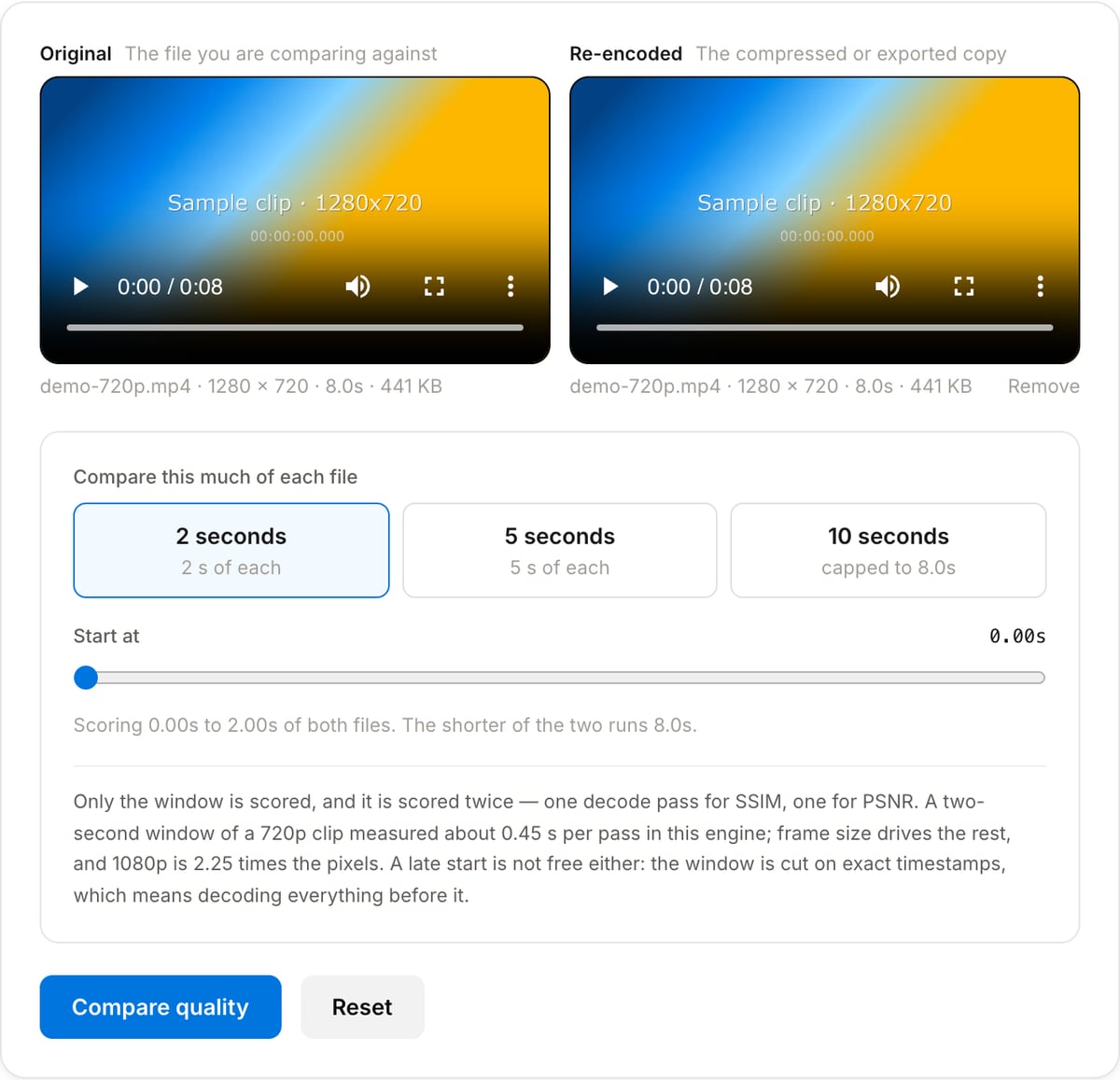
Popular task presets
Best for / not for
Best for
- Settling whether a compression setting cost anything visible — the same footage before and after an encode, scored instead of argued about.
- Choosing between two encoder settings: score each copy against the same original and compare the numbers.
- Checking a platform transcode, or a copy that came back from a client, against the master you delivered.
Not for
- Two different clips, or the same clip trimmed differently. Frame 1 is compared with frame 1, so a one-frame offset scores worse than heavy compression does.
- Files of different frame sizes or frame rates. The comparison is refused with the reason rather than scored — resize or convert one copy first.
- A whole-file score. A 2, 5 or 10 second window is what a single-threaded in-browser FFmpeg can do in seconds rather than minutes.
- VMAF. The browser build here is not compiled with libvmaf, so SSIM and PSNR are what is on offer.
When to measure instead of squint
- Choosing a CRF or a bitrate: encode two versions, score both against the original, and keep the smaller one that still reads as indistinguishable.
- Proving a delivery is intact — a re-wrap or a platform transcode that scores 0.999 is not the reason someone says it looks soft.
- Catching a mistake that only looks like compression: an accidental rescale, a chroma change, a frame offset. Each leaves its own signature across the two numbers.
- Writing the trade-off into a handover note: "38% of the original size, SSIM 0.993, PSNR 42 dB" settles more than "looks fine to me".
What the comparison can and cannot do
| Output | None. This page measures; it writes no file and there is nothing to download at the end. |
|---|---|
| Files needed | Two — the original and the copy being judged. The order does not matter: both metrics are symmetric, and it only decides which file the size line calls the original. |
| They have to match | Same frame size and same frame rate, measured after rotation is applied. A mismatch is refused with the reason rather than scored, because a pixel-against-pixel metric has nothing to line up. |
| How much is scored | 2, 5 or 10 seconds, starting anywhere inside the shorter file. Not the whole file. |
| Speed | The window is decoded twice, once per metric. Two seconds of 720p measured about 0.45 s per pass in this build; 1080p is 2.25 times the pixels, and a late start adds the decode of everything before the window. |
| Metrics | SSIM overall, per channel and at its worst frame; PSNR overall — error-averaged, the way FFmpeg reports its own — and at its worst frame. VMAF is not available in this build. |
| Privacy | Both files are decoded inside the browser tab. Nothing is uploaded, which is the point when the master is still under embargo. |
| Cost | Free for any use. No signup, and no watermark — there is no file to put one on. |
Quality Compare vs. the usual alternatives
| Feature | This tool | FFmpeg on the command line | Watching them side by side |
|---|---|---|---|
| What you get | SSIM and PSNR over a chosen window, plus the worst frame and what the score looks like | Any metric the build was compiled with, including VMAF where libvmaf is present | An opinion, and a different one from each person asked |
| Setup | Open a tab and pick two files | Install FFmpeg, write the filter graph, read the stats file | None |
| Where the files go | Nowhere — decoded in the browser tab | Nowhere — your own machine | Nowhere |
| Whole-file scores | No, 2 to 10 seconds per run | Yes | Not applicable |
| Mismatched inputs | Refused, with the mismatch named | Scored anyway, or stopped with a filter error | Not applicable |
| Best for | Settling one encode-against-original question in the time it takes to read this | Batch measurement, whole files, VMAF | The final call, once the numbers have narrowed it down |
VMAF is the metric streaming teams quote now. It needs libvmaf, which this WebAssembly build is not compiled with, so the command line is where that one lives.
Why measure it here
- The verdict matters more than the figure: 0.9931 means nothing on its own, so the card says what a score of that size looks like on a screen.
- It refuses the comparisons that would produce a confident wrong number — different frame sizes, different frame rates — rather than scoring them anyway.
- It names the worst frame in the window and when it happens, which is where to look when the average says the encode is fine and your eye disagrees.
- Nothing is uploaded, so an unreleased master can be checked against its export without leaving the machine it is on.
Task-focused FAQ
Which file goes in which slot?
Either way round. SSIM and PSNR are symmetric, so the order only decides which file the size line calls the original.
Why is there nothing to download?
The comparison produces measurements, not media. Both files are decoded, scored and discarded, and the result is the card on the page.
Can I compare a 4K master against a 1080p export?
Not directly — the metrics need a pixel for every pixel. Resize the master to 1080p first and compare that copy, remembering that the resize itself costs a little of the score.
Does the score cover the whole file?
No, only the window you chose. Pick a busy shot: a window over a fade to black flatters any encode, and one over a static title card flatters it more.
Frequently Asked Questions
What do SSIM and PSNR actually measure?
SSIM (structural similarity) scores structure — edges, texture, the pattern of light across a region — on a 0 to 1 scale, where 1.0000 means identical. It tracks how bad a re-encode looks to a person better than raw error does. PSNR (peak signal-to-noise ratio) reports the average pixel error as decibels: high is good, and each 6 dB is roughly half the error. Neither is a substitute for looking at the picture, but both put a number on an argument that otherwise goes in circles.
What SSIM score is good enough?
Above 0.99 the difference is invisible in playback and close to invisible on a paused frame. 0.975 to 0.99 softens fine detail and grain — findable if you pause, rarely noticed in motion. 0.95 to 0.975 shows banding in gradients and flat areas on a large screen. Below 0.95 the loss is visible during normal playback, and below 0.90 the two files usually are not the same frames at all.
Why does the tool refuse two files of different sizes or frame rates?
Both metrics set pixel against pixel and frame against frame. Across two frame sizes there is nothing to line up, and FFmpeg stops with an error rather than guessing. Across two frame rates frame 1 is compared with frame 1, frame 2 with frame 2 — at 30 fps against 25 fps those are different moments, and the score would measure the timing drift rather than the compression. Resize or convert one copy first, then compare that. One exception: a file that states no frame rate at all — some MKV and variable-frame-rate captures leave the field unset — cannot be checked, so the comparison runs and the result footnote says the rate check was skipped.
Why only a few seconds instead of the whole file?
The engine is FFmpeg compiled to WebAssembly on one thread, and every pass decodes both files. A two-second window of a 720p clip measured about 0.45 s per pass in this build; frame size drives the rest, and 1080p is 2.25 times the pixels — and the window is measured twice, once for SSIM, once for PSNR. A window from a representative shot tells you what a whole-file score would, in seconds rather than minutes.
My SSIM is high but the PSNR is low. Which one is lying?
Neither. That combination means the structure survived while the pixels moved, which is what happens when an encoder smooths film grain or sensor noise. PSNR counts every missing grain as error; your eye largely does not, and SSIM mostly agrees with your eye. The reverse pattern — low SSIM with a respectable PSNR — points at differences concentrated in edges and detail, which is what heavy sharpening or a scaling step looks like.
The score is terrible and the files look the same. What went wrong?
Almost always frame alignment. If one file has an extra frame at the front, or was trimmed a few frames differently, every pair after that point compares two different moments and the score collapses — far lower than any amount of compression would produce. Check that both files start on the same frame, then compare again.
Is anything uploaded?
No. Both files are read and decoded inside the browser tab, and the per-frame statistics are written to a scratch file in the engine and read straight back out. Nothing is sent to a server, and this tool has nothing to download at the end — it produces numbers, not a file.