Auto Captions — Word-by-Word, Burned In
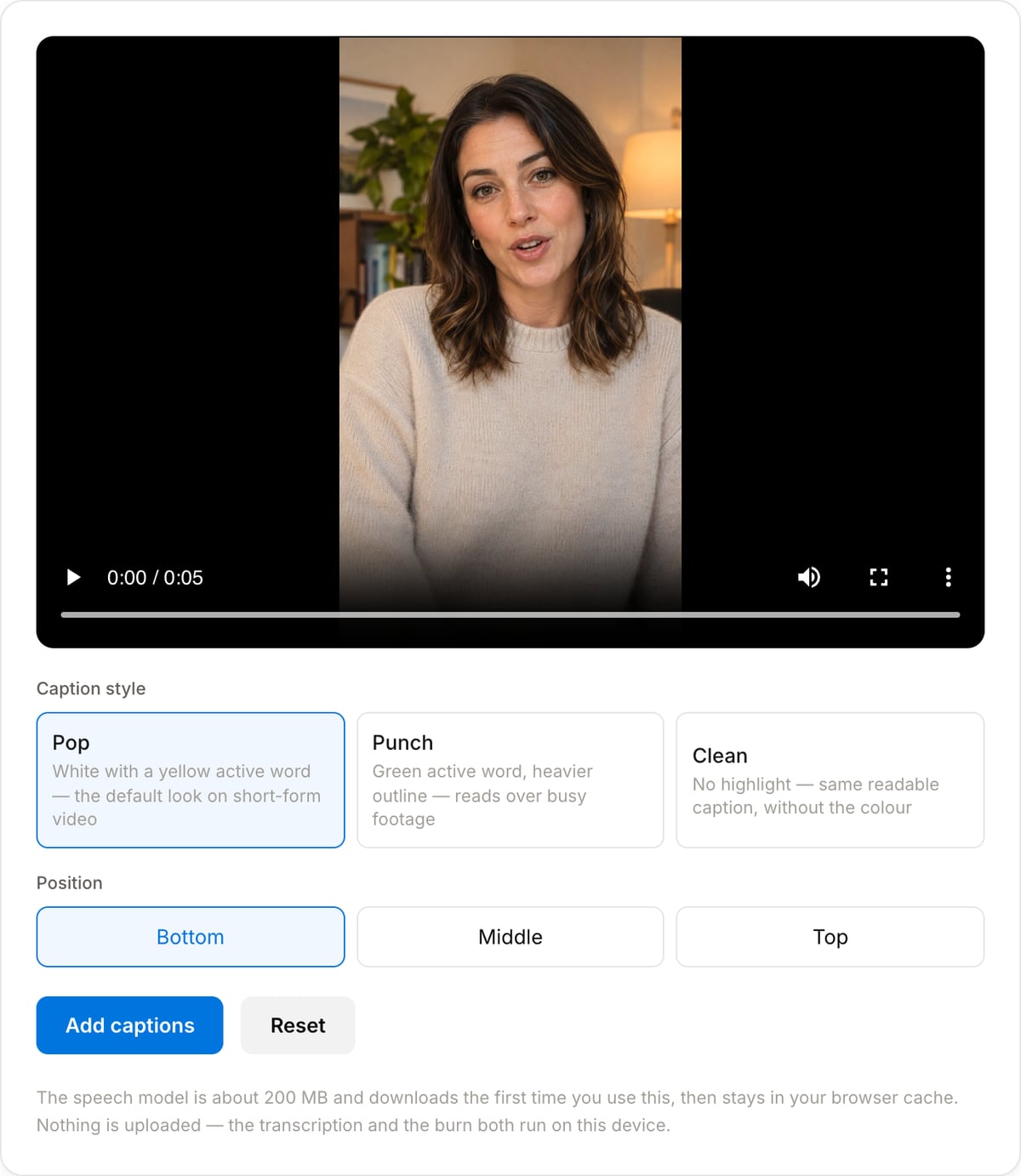
Drop a video and get it back with captions burned in, one word lit up at a time. The speech is transcribed and timed on your own device, so nothing is uploaded.
Drag & drop your video here, or click to browse
Max file size: ~2 GB (memory permitting)
What the tool looks like
What it produces
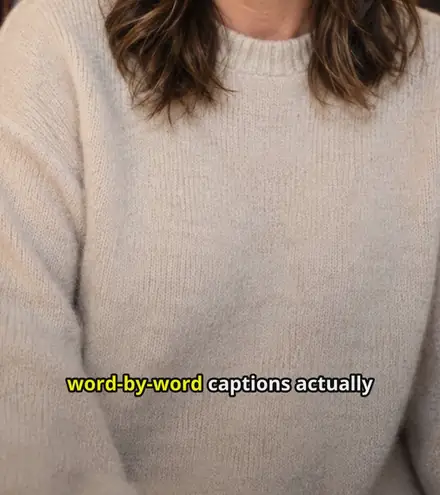
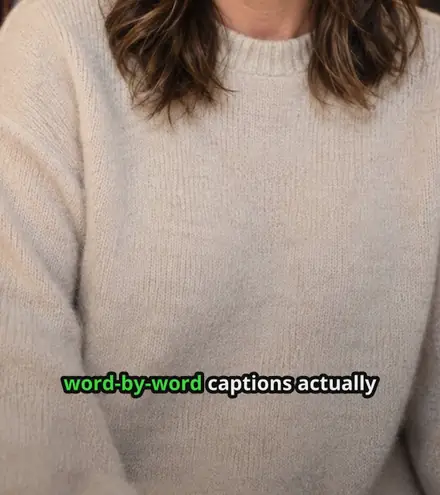
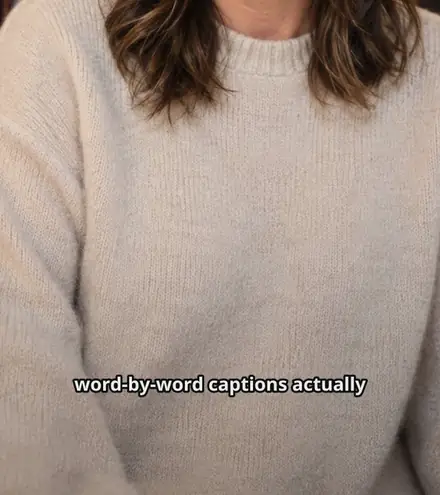
Each caption sits on screen for a few words at a time and the word being spoken is lit up as it is said. Below is the same frame of the same clip through each of the three styles.
How it works
- 1Drop the video in
Any common format. The audio is pulled out on your own machine — nothing is uploaded at any point.
- 2Press Add captions
The speech is transcribed with a timestamp on every word, the words are grouped into short readable phrases, and the captions are burned into the picture.
- 3Try another look if you want
The transcript is kept, so switching style or position only re-renders the video. That takes seconds instead of transcribing again.
What to expect from it
Speech recognition running on your own hardware is a real trade. It costs nothing, uploads nothing and has no per-minute limit, and in exchange it is slower than a server and makes the mistakes any speech model makes on accents, crosstalk and background noise. Read the result before publishing, and use the Subtitle Generator when the exact wording has to be right.
| First run | About 200 MB of model downloads once, then stays in your browser cache. |
|---|---|
| Speed | Roughly the clip length with WebGPU (Chrome, Edge, Safari 18+); several times that without it. |
| Best length | Under about three minutes. This is built for short-form, and the wait scales with the clip. |
| Output | 1080p-safe H.264 MP4 with the original audio copied through untouched. |
| Privacy | The audio and the video both stay on the device. There is no server in this workflow at all. |
Popular task presets
Best for / not for
Best for
- Short vertical clips where captions are the difference between someone watching and scrolling past.
- Talking-head video, podcast cuts, reactions and anything driven by what is being said.
- Footage that should not be uploaded to a transcription service — client work, internal recordings, anything under NDA.
Not for
- Precise editorial control over wording. The transcript is used as recognised; correct it in the Subtitle Generator and burn it separately if the exact words matter.
- Long videos. Transcription runs on your own machine and takes roughly the length of the clip, so an hour of footage is an hour of waiting.
- Animated or moving caption effects. The words light up in place; they do not bounce, scale or fly in.
When to use word-by-word captions
- Short-form video where most viewers watch with the sound off — captions are not an accessibility afterthought there, they are the content.
- Cutting a podcast or interview into clips, where the highlighted word is what keeps a talking head watchable.
- Anything with a punchline or a number in it, where the timing of the word landing on screen is the point.
- Recordings you would rather not hand to a cloud transcription service.
Supported formats & limits
| Input containers | MP4, MOV, WebM, MKV, AVI, FLV, WMV, M4V |
|---|---|
| Input codecs | H.264, H.265, VP8, VP9, MPEG-4, MJPEG. Not AV1 — this WebAssembly build has no software AV1 decoder. |
| Output container | MP4 (default) — interoperable with iOS, Android, YouTube, Instagram, X |
| Output codec | H.264 video + AAC audio |
| Max file size | Up to ~2 GB (limited by browser memory) |
| Max duration | No hard limit — depends on file size |
| Cost | Free for any use. No signup. No watermark. |
Auto Captions vs. the usual alternatives
| Feature | This tool | VEED (free) | Kapwing (free) | CapCut Online |
|---|---|---|---|---|
| Processing model | Runs locally in your browser | Upload-based project editor | Upload-based project editor | Upload-based online editor |
| File limits | No upload cap; practical limit is browser memory | Plan-specific upload limits | Plan-specific upload and export limits | Feature- and account-specific limits |
| Watermark on output | No watermark added | Free exports include a VEED watermark | Free exports include a Kapwing watermark | Standard edits can be watermark-free; templates/assets may add branding |
| Signup / account | No account for tools | Workspace/account flow | Workspace/account flow | CapCut account flow |
| Works offline | Yes after cache, subject to browser support | No | No | No |
| Best for | Private one-step file operations | Full editor, templates, AI tools | Collaboration, templates, AI tools | Social templates and timeline editing |
Vendor plan limits were checked on April 29, 2026 and can change by region, account state, and export option. Verify critical limits on the vendor pricing/help page before relying on them.
Why use this captioner
- Two actions: drop the file, press the button. The audio extraction, the transcription, the phrase layout and the burn all happen without another click.
- Real per-word timing, not a phrase split evenly into words — the model is one exported with the cross-attentions that word alignment needs.
- Changing the style afterwards only re-burns. The transcript is kept, so trying all three looks costs seconds rather than another full pass.
- Nothing is uploaded, including the audio. The model runs in your browser and is cached after the first use.
Task-focused FAQ
Is my video uploaded anywhere?
No. The speech model is downloaded to your browser and runs there, and the burn-in is FFmpeg compiled to WebAssembly. Neither the audio nor the video leaves the device.
Why is there a download the first time?
The speech model is about 200 MB. Your browser caches it, so the second video you caption starts straight away.
How long does it take?
Roughly the length of the clip on a machine with WebGPU, and noticeably slower without it. A one-minute clip is about a minute; an hour is an hour, which is why this suits short-form.
Can I fix a word it got wrong?
Not in this tool. Use the Auto Subtitle Generator, which gives you an editable transcript and an SRT, then burn that with the Subtitle Burner.
Which languages work?
The model auto-detects and handles the major languages Whisper supports. Accuracy drops on heavy accents and noisy recordings, as it does for every speech model.
Why does the highlighted word sometimes cover two words?
Whisper reports hyphenated compounds as one token, so "word-by-word" lights up together. That is how it was recognised, not a timing error.
Tutorials covering this tool
Frequently Asked Questions
Is my video uploaded anywhere?
No. The speech model is downloaded to your browser and runs there, and the burn-in is FFmpeg compiled to WebAssembly. Neither the audio nor the video leaves the device.
Why is there a download the first time?
The speech model is about 200 MB. Your browser caches it, so the second video you caption starts straight away.
How long does it take?
Roughly the length of the clip on a machine with WebGPU, and noticeably slower without it. A one-minute clip is about a minute; an hour is an hour, which is why this suits short-form.
Can I fix a word it got wrong?
Not in this tool. Use the Auto Subtitle Generator, which gives you an editable transcript and an SRT, then burn that with the Subtitle Burner.
Which languages work?
The model auto-detects and handles the major languages Whisper supports. Accuracy drops on heavy accents and noisy recordings, as it does for every speech model.
Why does the highlighted word sometimes cover two words?
Whisper reports hyphenated compounds as one token, so "word-by-word" lights up together. That is how it was recognised, not a timing error.