Auto Subtitle Generator — Video to SRT, Free & Private
Transcribe speech from any video or audio with Whisper AI running inside your browser. Edit the lines, export SRT, VTT or TXT, then burn them into the video.
Drag & drop your video here, or click to browse
MP4, MOV, WebM · MP3, WAV, M4A
How to Use — Auto Subtitle Generator — Video to SRT, Free & Private
Upload the video or audio
MP4, MOV, WebM, MP3, WAV, M4A — the audio track is decoded locally. Nothing is uploaded; the speech-recognition model runs inside your browser tab.
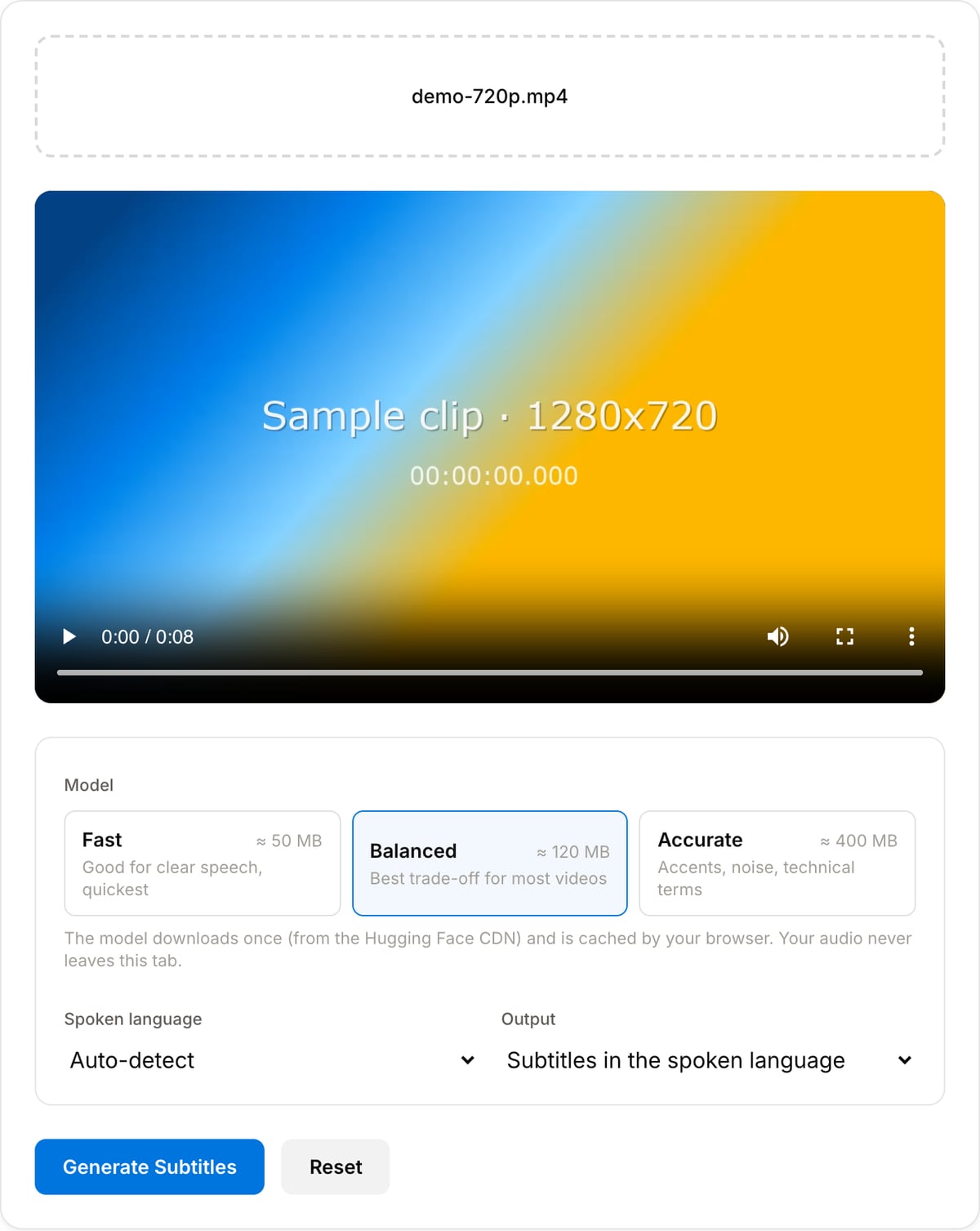
Pick a model and language
Balanced is right for most footage. Leave the language on auto-detect or set it explicitly for better accuracy; choose "translate to English" for foreign-language clips.
Generate, edit, export
The first run downloads the model once (then it is cached). Fix any word in the editable list, then download SRT, VTT or TXT — or continue to the Subtitle Burner to hard-code the captions into the video.
What the tool looks like
Popular task presets
Best for / not for
Best for
- Creators who need captions for Reels, Shorts and TikTok without paying per minute.
- Interviews, podcasts, lectures and meeting recordings that must stay private.
- Editors who want an SRT to drop into Premiere, Resolve, Final Cut or CapCut.
- Foreign-language clips that need English subtitles (Whisper translate task).
Not for
- Speaker diarisation ("who said what") — Whisper does not label speakers.
- Translating into languages other than English.
- Very old browsers without WebAssembly; phones with little RAM struggle with the Accurate model.
- Live/real-time captioning of a stream.
Best use cases for the auto subtitle generator
- Caption short-form video: most viewers watch Reels, Shorts and TikToks muted, and burned-in captions lift watch time.
- Produce an SRT for YouTube so the platform indexes the spoken content and viewers can toggle captions.
- Transcribe interviews, podcasts and lectures to text for show notes, quotes and search.
- Generate English subtitles for Spanish, French, German, Japanese or Korean footage with the translate mode.
- Draft captions for accessibility compliance, then polish them in the built-in editor.
Supported formats & limits
| Input | MP4, MOV, WebM, MKV, MP3, WAV, M4A, FLAC, OGG — anything the browser or FFmpeg can decode |
|---|---|
| Models | Whisper tiny (≈50 MB), base (≈120 MB), small (≈400 MB) from the onnx-community repositories; downloaded once and cached |
| Languages | 20+ selectable plus auto-detect; translation target is English only |
| Output | SRT, VTT, plain text; editable line by line before export |
| Speed | WebGPU: ~10–20× real time (base). WASM fallback: ~1× real time (tiny) |
| Privacy | Audio never leaves the tab. Only model files are downloaded, from the Hugging Face CDN. |
| Cost | Free, unlimited minutes. No signup. No watermark. |
Auto Subtitle Generator vs. the usual alternatives
| Feature | This tool | VEED | Kapwing | CapCut |
|---|---|---|---|---|
| Where transcription runs | In your browser (Whisper on WebGPU/WASM) | Cloud | Cloud | Cloud |
| Free minutes | Unlimited | Capped per month | Capped per month | Capped, account required |
| Upload required | No | Yes | Yes | Yes |
| Export SRT/VTT for free | Yes | Paid | Paid | Limited |
| Speaker labels | No | Yes | Yes | No |
| Best for | Private, unlimited captioning | Full editor + captions | Team workflows | Social templates |
Cloud services were checked in September 2026; free-tier limits change often — verify on the vendor pricing page.
Why this subtitle generator is different
- Unlimited and free because there is no server bill: the Whisper model runs on your GPU, not ours.
- The audio never leaves your device — the only network traffic is the one-time model download.
- Real subtitle files (SRT/VTT with timestamps), not a locked-in editor project.
- Straight into the Subtitle Burner and Subtitle Styler on the same site to finish the job locally.
Task-focused FAQ
Which model should I choose?
Balanced (base) for most videos. Fast (tiny) when the speech is clear and you want it done in seconds, or when you are on CPU. Accurate (small) for accents, background music or names and jargon — it is a 400 MB download, so only on a good connection.
Does it work on a phone?
Modern iPhones and Android phones with WebGPU can run the Fast and Balanced models. The Accurate model may run out of memory on phones — use a laptop for that one.
Can I edit the timing, not just the text?
The editor changes text only. For a constant offset use the SRT Offset tool; for individual cue timing open the SRT in any subtitle editor — it is a plain text file.
Tutorials covering this tool
Frequently Asked Questions
How accurate are the subtitles?
It uses OpenAI's Whisper models — the same family behind most commercial "auto caption" services. On clear speech the Balanced model is typically 90–95% word-accurate; the Accurate model closes most of the gap on accents, music beds and technical vocabulary. You can correct anything in the editor before exporting.
Is my video really not uploaded anywhere?
Correct. The audio is decoded by your browser, and the Whisper model (downloaded once from the Hugging Face CDN and cached) runs on your GPU or CPU via WebAssembly. Open the DevTools Network tab while it runs: you will see model files coming in, and nothing going out.
How long does it take?
With WebGPU (Chrome, Edge, Safari 18+) the Balanced model transcribes at roughly 10–20× real time — a 10-minute video in under a minute after the one-time model download. Without WebGPU it falls back to CPU and runs near real time, so use the Fast model for long files.
Which languages are supported?
Whisper is multilingual: English, Spanish, French, German, Italian, Portuguese, Dutch, Polish, Russian, Ukrainian, Turkish, Arabic, Hindi, Indonesian, Vietnamese, Thai, Japanese, Korean, Chinese, Swedish and more. Auto-detect works well when the clip has a few seconds of clear speech; pick the language manually for short or noisy clips.
Can it translate the subtitles?
It can translate any supported language into English (Whisper's built-in translate task). Translating into other languages is not supported yet — export the SRT and run it through a translator.
How do I add the subtitles to the video itself?
Download the SRT, then open the Subtitle Burner and drop the video and the SRT in — it renders the captions into the picture (hard subs) locally. If you want soft subtitles instead, upload the SRT alongside the video on YouTube, Vimeo or in your editor.
Why did it fail to load the model?
The model files are fetched from huggingface.co on first use. A corporate proxy, an ad blocker with aggressive rules, or a region where Hugging Face is unreachable will block that download. Try another network or browser; once cached, the model no longer needs the network.