Remove Background from Image — Free AI, No Upload
Cut the subject out of any photo, product shot or AI render. The segmentation model runs in your browser; export a transparent PNG or WebP, or drop it on a colour.
Drop an image here, or click to browse
Up to 50 MB · PNG, JPG, WebP, HEIC
How to Use — Remove Background from Image — Free AI, No Upload
Upload a photo
PNG, JPG, WebP, HEIC or an AI render from GPT Image, Midjourney or DALL-E. The image stays on your device — the segmentation model runs inside the browser.
Remove the background
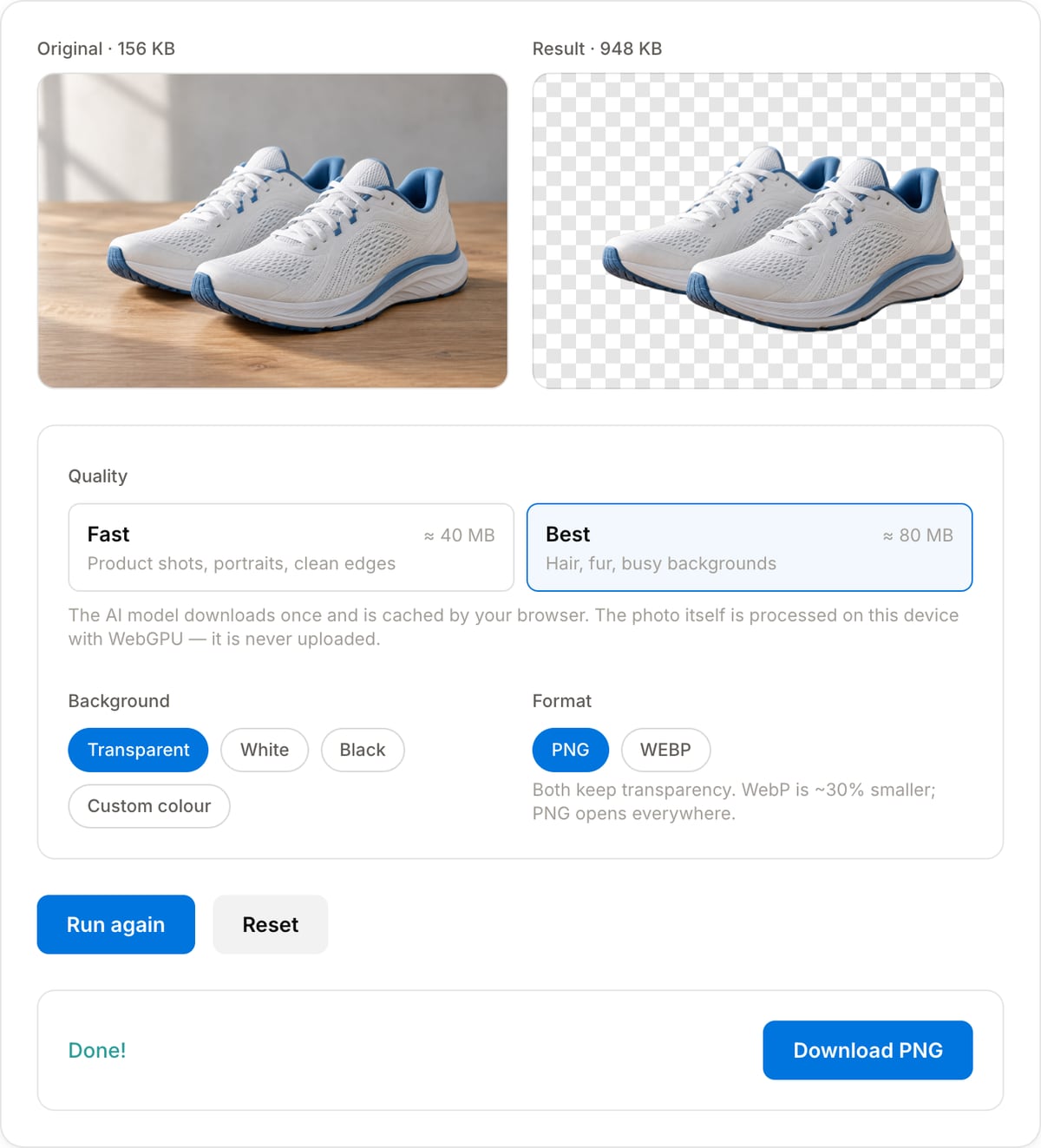
Fast handles product shots and portraits; Best is worth the larger one-time model download for hair, fur and cluttered backgrounds. The model is cached after the first run.
Pick a background and download
Keep it transparent, or drop the cut-out on white, black or any colour. Export as PNG or WebP with the alpha channel intact.
What the tool looks like
Popular task presets
Best for / not for
Best for
- Product photos for Shopify, Amazon, Etsy and eBay listings.
- Portraits, pets and objects for thumbnails, profile pictures and presentations.
- AI renders from GPT Image, Midjourney or DALL-E that need a clean transparent cut-out.
- Logos and stickers where you need a real alpha channel, not a white box.
Not for
- Very fine hair or fur against a similarly coloured, busy background (try Best quality first).
- Batch-processing hundreds of images at once — this tool runs one at a time.
- Semi-transparent objects like glass or smoke.
Best use cases for the image background remover
- Cut products out of phone photos for a marketplace listing with a clean white or transparent background.
- Make a transparent headshot for a YouTube thumbnail, a slide or a Discord avatar.
- Isolate an AI-generated character or object so it can be composited elsewhere.
- Turn a scanned logo or drawing into a PNG with a true alpha channel.
- Prepare stickers and overlays for video edits and social posts.
Supported formats & limits
| Input | PNG, JPG, WebP, AVIF, GIF (first frame), BMP, HEIC (Safari) — up to 50 MB |
|---|---|
| Model | IS-Net via @imgly/background-removal — quantised (≈40 MB) or fp16 (≈80 MB); downloaded once and cached |
| Output | PNG or WebP with alpha, at the original resolution; optional solid-colour background |
| Speed | WebGPU: 1–3 s per photo after the first run. CPU/WASM: 5–15 s |
| Privacy | The photo is never uploaded — only model files are downloaded, from the IMG.LY CDN. |
| Cost | Free, unlimited images. No signup. No watermark. |
Image Background Remover vs. the usual alternatives
| Feature | This tool | remove.bg | Canva | Adobe Express |
|---|---|---|---|---|
| Where it runs | In your browser (ONNX on WebGPU/WASM) | Cloud | Cloud | Cloud |
| Free full-resolution download | Yes | No (0.25 MP preview) | Pro feature | Limited credits |
| Upload required | No | Yes | Yes | Yes |
| Account required | No | For HD | Yes | Yes |
| Hair and fine edges | Good (Best mode) | Excellent | Very good | Very good |
| Best for | Private, unlimited, full-res cut-outs | Top-tier edge quality | Design workflows | Adobe users |
Vendor plans were checked in September 2026 and change frequently — confirm on their pricing pages.
Why this background remover is different
- Full-resolution output for free — no low-res preview, no credits, no watermark.
- Photos never leave your device: the segmentation model runs locally, which matters for unreleased products and personal photos.
- Choose transparent, white, black or any colour and swap between them instantly without re-running the model.
- Lives next to the image compressor, resizer and video overlay tools, so the whole workflow stays on one private site.
Task-focused FAQ
Why does the first image take longer?
The model is downloaded on first use — about 40 MB for Fast or 80 MB for Best — and cached by the browser. Every image after that skips the download.
The edge looks jagged — what can I do?
Switch to Best quality, and give the model a higher-resolution source if you have one. A little blur or a 1 px inner shadow in your design tool hides the remaining halo.
Can I remove the background from a video frame?
Grab the frame with the Frame Extractor, then run it through this tool. For whole videos shot on a green screen, use the Green Screen tool.
Tutorials covering this tool
Frequently Asked Questions
Is the image uploaded to a server?
No. The tool loads an open-source segmentation model (IS-Net, via IMG.LY's background-removal library) into your browser and runs it with WebGPU or WebAssembly. Only the model weights are downloaded — the photo never leaves the tab.
How good is it compared to remove.bg or Canva?
For typical use — products, people, pets, logos on flat backgrounds — the results are comparable and you get the full-resolution image for free rather than a 0.25-megapixel preview. Very fine hair against a busy background is where paid services with larger models still have an edge; try the Best quality setting first.
Why is the first run slow?
The model (about 40 MB for Fast, 80 MB for Best) has to be downloaded once. It is cached by your browser, so the next image processes in a second or two on a machine with WebGPU. Without WebGPU it runs on the CPU and takes 5–15 seconds per photo.
Does it keep the original resolution?
Yes. The mask is computed at the model's working size and then applied to your original pixels, so a 4000×3000 photo comes back at 4000×3000 with a clean alpha channel.
Can I use the cut-out in video?
Yes — download the transparent PNG and drop it on the Logo Watermark or Picture-in-Picture tool to overlay it on a clip, or use it as a thumbnail element. For removing a green screen from footage, use the Green Screen tool.
Which output should I choose, PNG or WebP?
PNG for maximum compatibility (Photoshop, Canva, Keynote, Word). WebP if it goes on a website — same transparency, roughly 30% smaller. Both are lossless-quality here.