Resize Image for Instagram, TikTok, DALL-E, Midjourney (1024, 2048) — Free
Resize images to AI-generator native sizes (1024², 2048², 1024×1792) and social presets (Reels 9:16, IG 1:1, X 16:9). No upload.
Drop image (PNG/JPG/WebP/AVIF)
Up to 50 MB
What the tool looks like
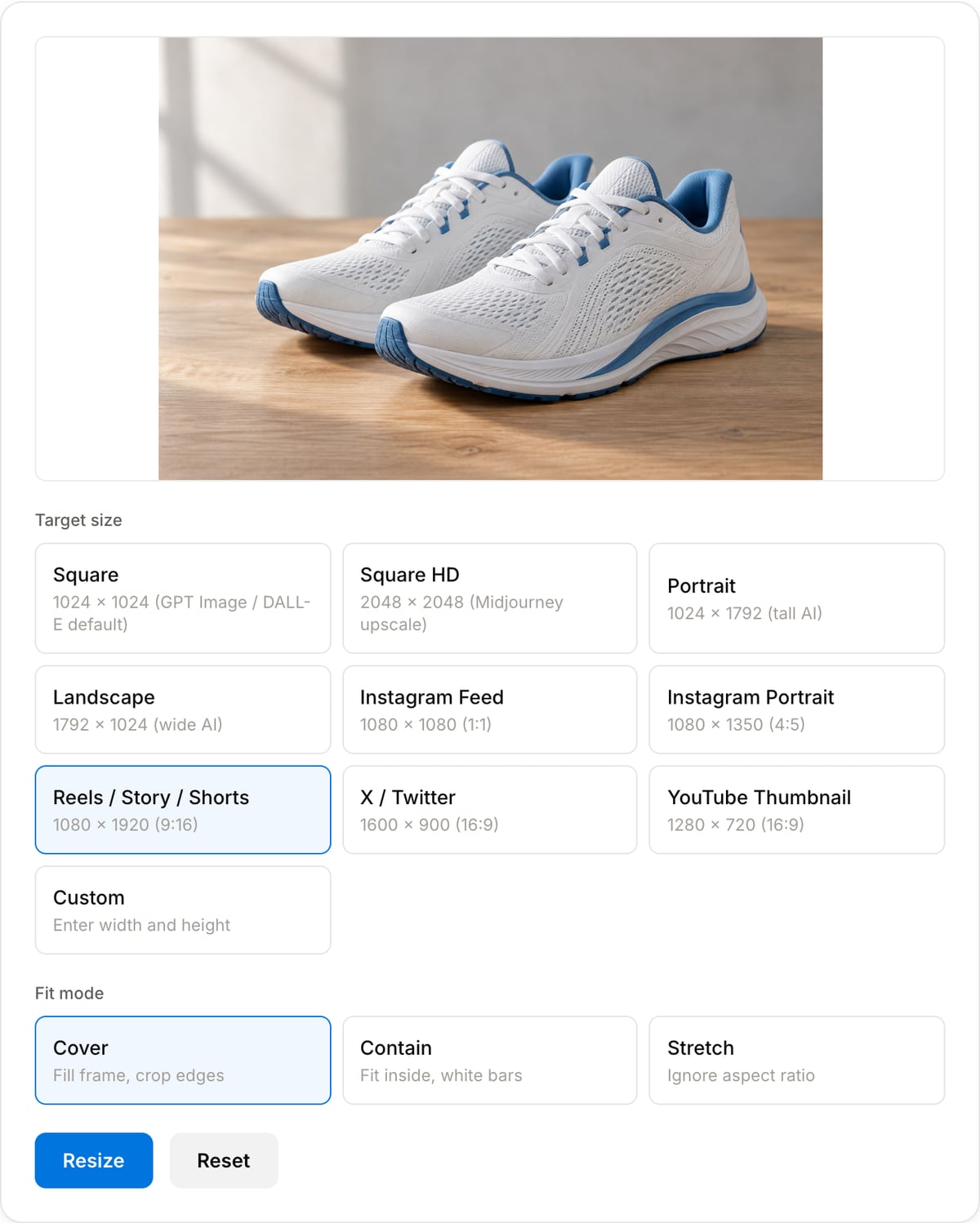
Popular task presets
Best for / not for
Best for
- Exact pixel dimensions for thumbnails, social posts, website assets, ads, avatars, and AI image exports.
- Cover/contain/stretch choices where the frame size matters as much as the image itself.
- Local resizing of client or unreleased images.
Not for
- Upscaling tiny images into truly high-detail artwork.
- Batch resizing large image libraries.
- Cropping complex subjects with object-aware selection.
When to resize an image
- Social feed needs specific dimensions (Reels 1080×1920, IG feed 1080×1080, YouTube thumbnail 1280×720) — preset buttons cover all common platforms.
- AI-generator upscaling — turn a 1024² DALL-E output into 2048² for Midjourney-style prints.
- Stock or print workflow that requires an exact pixel dimension.
Supported formats & limits
| Input formats | PNG, JPG/JPEG, WebP, AVIF, GIF, BMP, HEIC (Safari), TIFF — anything your browser can decode |
|---|---|
| Output formats | PNG (lossless), JPEG (quality 10-100), WebP (quality 10-100), AVIF on Chrome/Edge 122+ and Safari 16.4+ |
| AI-generator native sizes | 1024×1024 (GPT Image / DALL-E square), 1024×1792 (portrait), 1792×1024 (landscape), 2048×2048 (Midjourney upscale) |
| Max file size | Up to 50 MB per image |
| Privacy | Zero uploads — Canvas API runs fully on-device. Open DevTools Network tab to verify. |
| Cost | Free for any use. No signup, no watermark. |
Image Resizer vs. the usual alternatives
| Feature | This tool | VEED (free) | Kapwing (free) | CapCut Online |
|---|---|---|---|---|
| Processing model | Runs locally in your browser | Upload-based project editor | Upload-based project editor | Upload-based online editor |
| File limits | No upload cap; practical limit is browser memory | Plan-specific upload limits | Plan-specific upload and export limits | Feature- and account-specific limits |
| Watermark on output | No watermark added | Free exports include a VEED watermark | Free exports include a Kapwing watermark | Standard edits can be watermark-free; templates/assets may add branding |
| Signup / account | No account for tools | Workspace/account flow | Workspace/account flow | CapCut account flow |
| Works offline | Yes after cache, subject to browser support | No | No | No |
| Best for | Private one-step file operations | Full editor, templates, AI tools | Collaboration, templates, AI tools | Social templates and timeline editing |
Vendor plan limits were checked on April 29, 2026 and can change by region, account state, and export option. Verify critical limits on the vendor pricing/help page before relying on them.
Why resize here
- Built-in presets for the four GPT Image / DALL-E native sizes (1024², 2048², 1024×1792, 1792×1024) — matches what those models actually emit.
- Cover / Contain / Stretch fit modes for controlling how the image maps into the target frame.
- No upload. No size cap beyond browser memory.
Task-focused FAQ
What size should I use for a YouTube thumbnail?
Use 1280x720 for a 16:9 thumbnail. Keep text large enough to read after YouTube scales it down.
What is the difference between cover and contain?
Cover fills the target frame and can crop edges. Contain keeps the full image visible and adds empty space if the aspect ratios differ.
Should I resize before compressing?
Yes. Reducing pixel dimensions first usually saves more bytes than lowering JPEG/WebP quality alone.
Frequently Asked Questions
What size should I use for GPT Image 2, DALL-E 3, or Midjourney?
GPT Image 2 / DALL-E 3 default to 1024×1024 square, 1024×1792 portrait, or 1792×1024 landscape. Midjourney v6+ generates 1024×1024 by default and can upscale to 2048×2048. Presets for all four sizes are built in.
What’s the right size for Instagram / Reels / TikTok / YouTube?
Instagram Feed: 1080×1080 (square) or 1080×1350 (4:5 portrait — larger footprint). Reels / TikTok / Shorts: 1080×1920. YouTube Thumbnail: 1280×720. X / Twitter: 1600×900. Presets cover all of these.
Cover vs Contain vs Stretch — which one?
Cover fills the target and crops the edges (best for platform avatars/banners where you want the frame filled). Contain fits the whole image and adds white bars (best for archival / cross-platform). Stretch ignores aspect ratio (use only when you know what you're doing).
Will resizing up make my image blurry?
Scaling a 1024×1024 AI image to 2048×2048 with canvas bilinear blur is the same quality as Photoshop bicubic. For better upscaling (adding detail, not just pixels), use a dedicated AI upscaler — that's not what this tool does.
Does my image upload anywhere?
No. Canvas resize runs in your browser. Open DevTools Network — zero uploads. Safe for private AI renders, client work, NDA content.