Remove Black Bars from Video Online Free
Detect the letterbox or pillarbox bars around your footage and crop them away. Detection and cropping both run in your browser, so the file never uploads.
Drag & drop your video here, or click to browse
Max file size: ~2 GB (memory permitting)
How to Use — Remove Black Bars from Video Online Free
Drop in your video
MP4, MOV, WebM, MKV, and AVI all work. The file stays on your device.
Detect the bars
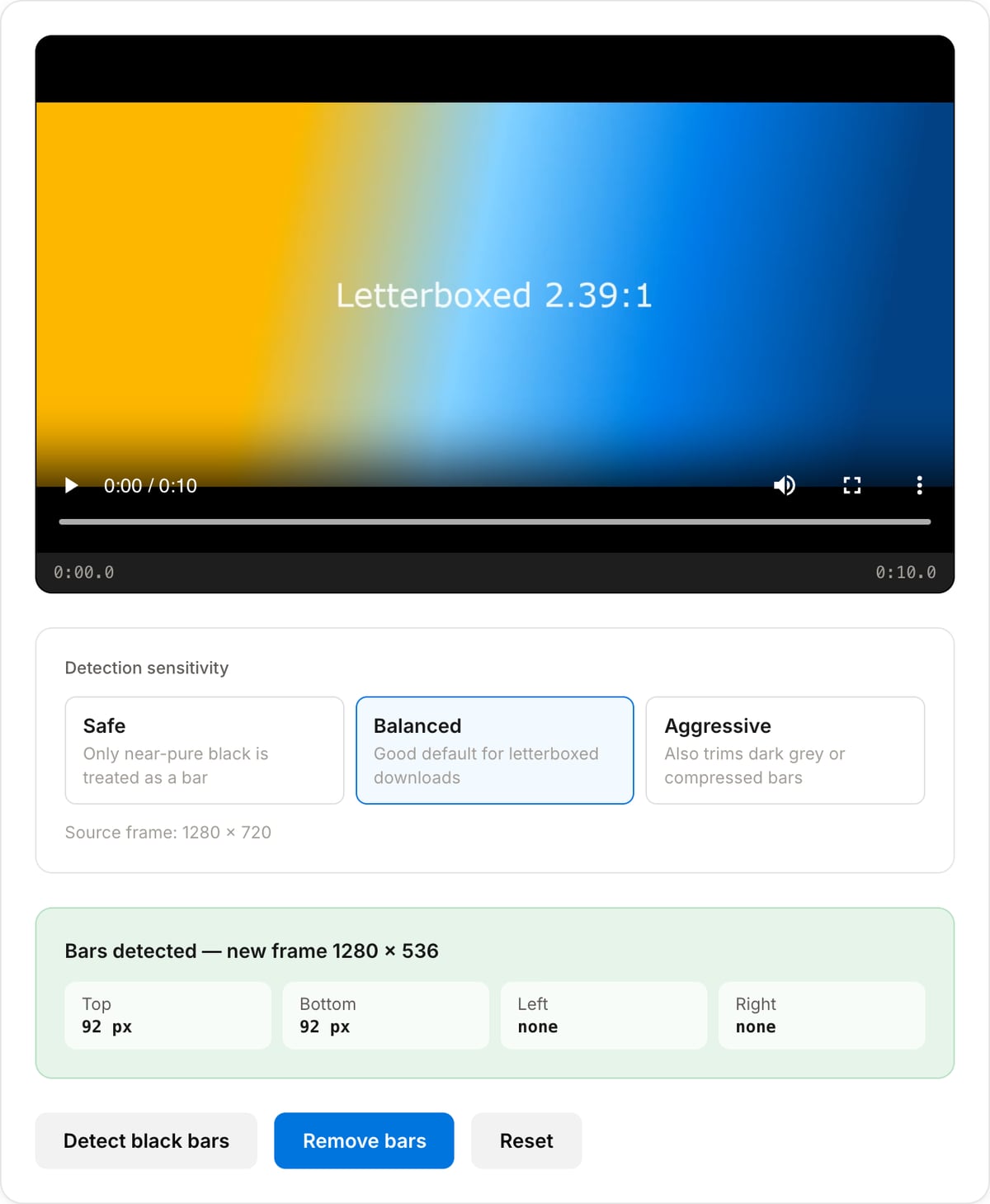
The tool samples a few seconds and reports the crop rectangle plus how many pixels sit on each edge.
Crop and download
Apply the crop to get a clip whose frame is just the picture, with the audio untouched.
What the tool looks like
Popular task presets
Best for / not for
Best for
- Letterboxed downloads where black bars are baked into the picture rather than added by the player.
- Footage that has been through a resize and came back pillarboxed.
- Clips that will be re-uploaded vertically, where the bars would otherwise be cropped into the frame.
Not for
- Bars that appear only in one player — those are added at playback and there is nothing in the file to crop.
- Bars that change size during the clip, such as a film that switches aspect ratio between scenes.
- Removing a watermark or a subtitle strip, which need masking rather than cropping.
When to remove black bars
- A downloaded clip that arrived letterboxed, where the bars waste a third of the height on a phone screen.
- Footage that was exported to 16:9 from a vertical source and came back with thick pillarbox bars.
- Preparing a clip for a vertical upload, where leaving the bars in means the platform crops into them and the picture ends up even smaller.
- Cleaning up screen-recorded video calls, which often frame a smaller picture inside a larger black canvas.
Supported formats & limits
| Input containers | MP4, MOV, WebM, MKV, AVI, FLV, WMV, M4V |
|---|---|
| Input codecs | H.264, H.265, VP8, VP9, MPEG-4, MJPEG. Not AV1 — this WebAssembly build has no software AV1 decoder. |
| Output container | MP4 (default) — interoperable with iOS, Android, YouTube, Instagram, X |
| Output codec | H.264 video + AAC audio |
| Max file size | Up to ~2 GB (limited by browser memory) |
| Max duration | No hard limit — depends on file size |
| Cost | Free for any use. No signup. No watermark. |
Black Bar Remover vs. the usual alternatives
| Feature | This tool | VEED (free) | Kapwing (free) | CapCut Online |
|---|---|---|---|---|
| Processing model | Runs locally in your browser | Upload-based project editor | Upload-based project editor | Upload-based online editor |
| File limits | No upload cap; practical limit is browser memory | Plan-specific upload limits | Plan-specific upload and export limits | Feature- and account-specific limits |
| Watermark on output | No watermark added | Free exports include a VEED watermark | Free exports include a Kapwing watermark | Standard edits can be watermark-free; templates/assets may add branding |
| Signup / account | No account for tools | Workspace/account flow | Workspace/account flow | CapCut account flow |
| Works offline | Yes after cache, subject to browser support | No | No | No |
| Best for | Private one-step file operations | Full editor, templates, AI tools | Collaboration, templates, AI tools | Social templates and timeline editing |
Vendor plan limits were checked on April 29, 2026 and can change by region, account state, and export option. Verify critical limits on the vendor pricing/help page before relying on them.
Why use this black bar remover
- The bars are detected from actual frames rather than guessed from the aspect ratio, so an odd crop like 2.39:1 inside 16:9 is found correctly.
- Three sensitivity settings: only near-pure black, a balanced default, or aggressive enough to catch the dark grey bars that heavy compression leaves behind.
- You see the detected crop before it is applied, so a wrong detection costs nothing.
- The audio track is copied rather than re-encoded, so only the picture changes.
Task-focused FAQ
Nothing was detected — why?
The bars are probably not in the file. Many players add them at playback to fit the window, in which case there is nothing to crop. Try the aggressive setting first; if that finds nothing either, the video is already full-frame.
It cropped too much. What now?
Switch to the safe setting, which only treats near-pure black as a bar. Aggressive also trims dark grey, which can eat into a genuinely dark scene.
Will this change the resolution?
Yes. Removing bars makes the picture smaller in pixels — that is the point. Use the Video Resolution tool afterwards if you need an exact output size.
Frequently Asked Questions
Why does my video have black bars in the first place?
They are padding. A 2.39:1 cinema frame placed in a 16:9 container gets bars above and below (letterbox); a vertical phone clip placed in a 16:9 container gets bars left and right (pillarbox). The bars are real pixels baked into the file, which is why cropping is the only way to remove them.
How does the detection work?
It runs FFmpeg's cropdetect filter over a few seconds sampled from partway into the clip, which measures how far the picture actually extends, then reports the crop rectangle. Sampling from the middle rather than the start avoids mistaking a fade-in or a black title card for bars.
What do the three sensitivity settings change?
They set how dark a pixel has to be before it counts as part of a bar. Safe only treats near-pure black that way, Balanced suits most letterboxed downloads, and Aggressive also trims dark grey bars left behind by heavy compression. If a crop looks too tight, step down a level and detect again.
Will removing the bars reduce quality?
Cropping changes the frame size, so the video is re-encoded once with H.264. The audio track is stream-copied and stays bit-identical. One re-encode at default quality is visually very close to the source; repeatedly cropping the same file is what degrades it.
It says no black bars were found, but I can see them.
Two common causes. The bars may be very dark grey rather than black, in which case Aggressive will catch them. Or your player is adding the bars itself to fit its own window, in which case the file has none and nothing needs cropping. Check the reported source frame size against the aspect ratio you expect.
Does the file upload anywhere?
No. Both the detection pass and the crop run through FFmpeg WebAssembly inside this tab. Open DevTools and watch the Network panel while you use it: nothing leaves your device.