Vocal Remover & Karaoke Maker — Free, No Upload
Cancel the centred lead vocal out of a stereo track to get a backing version, with an option to keep the bass and kick that normally disappear with it. Runs entirely in your browser.
Drop a song or video here, or click to browse
MP3, WAV, M4A, FLAC · MP4, MOV, WebM
How to Use — Vocal Remover & Karaoke Maker — Free, No Upload
Drop in a stereo song
MP3, WAV, M4A and FLAC all work, as does the audio inside a video file.
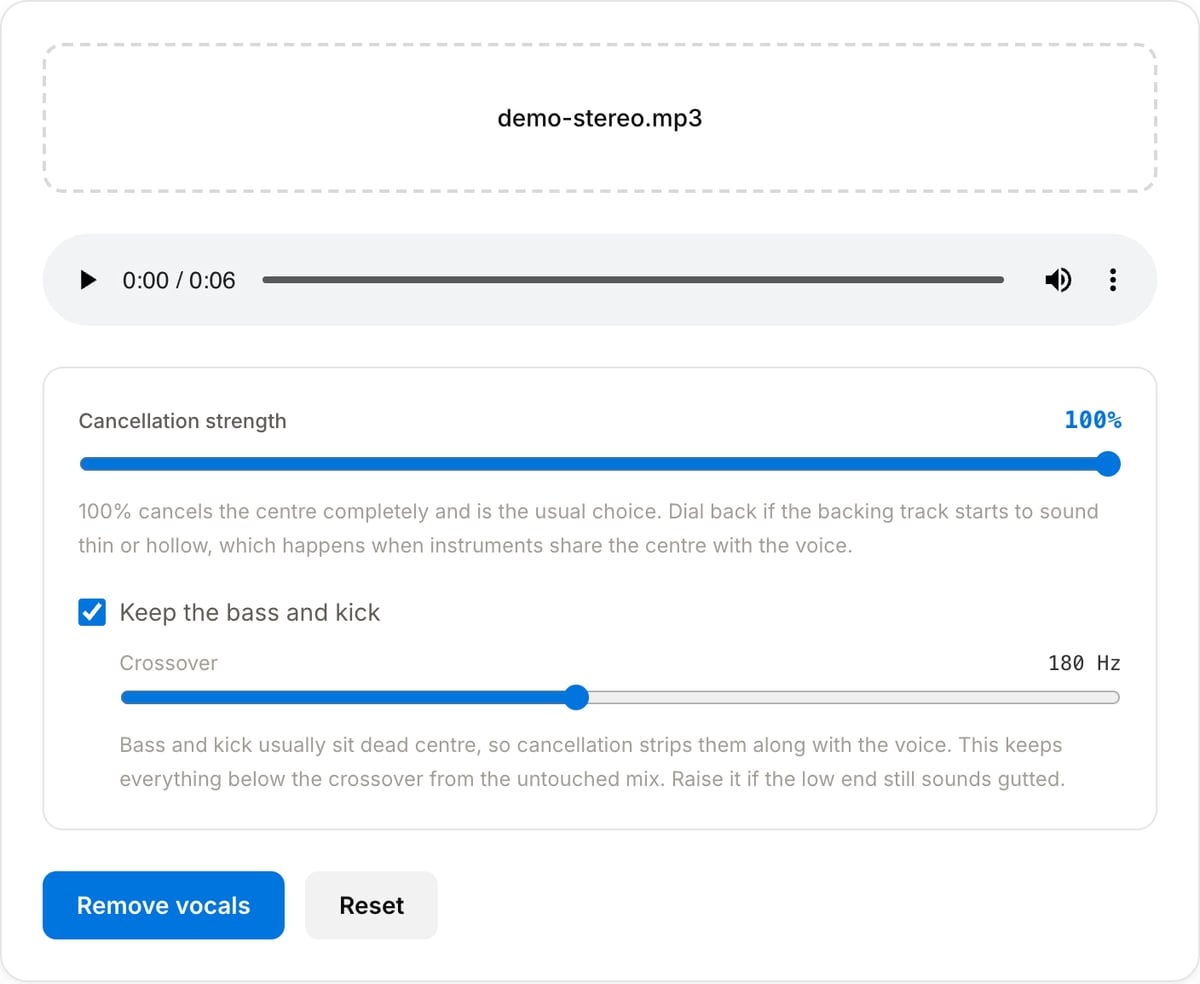
Set the strength and bass
Leave both at their defaults first. Dial the strength back if the backing sounds hollow, or raise the crossover if the low end is missing.
Remove the vocals and download
You get an MP3 backing track, ready for practice or karaoke.
What the tool looks like
Popular task presets
Best for / not for
Best for
- Ordinary stereo mixes where the lead vocal sits dead centre, which covers most commercial pop.
- Making a rough karaoke or practice backing track quickly.
- Checking what an arrangement sounds like without the lead line.
Not for
- Mono files. The method works on the difference between the two channels, and a mono file has none.
- Live recordings, heavy reverb, or mixes where the vocal is deliberately off-centre.
- Studio-quality stem separation — that needs a trained model, not channel cancellation.
When to remove vocals
- Making a karaoke version of a song for a party, a class, or a practice session.
- Rehearsing an instrument against a track without the lead line in the way.
- Checking an arrangement — what the bass and drums are actually doing under the vocal.
- Producing a rough instrumental bed for a video when licensing the real instrumental is not an option.
Supported formats & limits
| Input containers | MP4, MOV, WebM, MKV, AVI, FLV, WMV, M4V |
|---|---|
| Input codecs | H.264, H.265, VP8, VP9, MPEG-4, MJPEG. Not AV1 — this WebAssembly build has no software AV1 decoder. |
| Output container | MP4 (default) — interoperable with iOS, Android, YouTube, Instagram, X |
| Output codec | H.264 video + AAC audio |
| Max file size | Up to ~2 GB (limited by browser memory) |
| Max duration | No hard limit — depends on file size |
| Cost | Free for any use. No signup. No watermark. |
Vocal Remover vs. the usual alternatives
| Feature | This tool | VEED (free) | Kapwing (free) | CapCut Online |
|---|---|---|---|---|
| Processing model | Runs locally in your browser | Upload-based project editor | Upload-based project editor | Upload-based online editor |
| File limits | No upload cap; practical limit is browser memory | Plan-specific upload limits | Plan-specific upload and export limits | Feature- and account-specific limits |
| Watermark on output | No watermark added | Free exports include a VEED watermark | Free exports include a Kapwing watermark | Standard edits can be watermark-free; templates/assets may add branding |
| Signup / account | No account for tools | Workspace/account flow | Workspace/account flow | CapCut account flow |
| Works offline | Yes after cache, subject to browser support | No | No | No |
| Best for | Private one-step file operations | Full editor, templates, AI tools | Collaboration, templates, AI tools | Social templates and timeline editing |
Vendor plan limits were checked on April 29, 2026 and can change by region, account state, and export option. Verify critical limits on the vendor pricing/help page before relying on them.
Why use this vocal remover
- Adjustable strength rather than a single fixed cancellation, so you can trade vocal bleed against damage to the rest of the mix.
- A keep-bass option with a crossover control. Plain centre cancellation also removes the kick and bass, which are usually centred too, and that is what makes most free karaoke tracks sound hollow.
- It tells you when the file is mono, instead of silently returning something that cannot work.
- No upload and no processing queue — the track is handled on your own machine.
Task-focused FAQ
Why can I still hear the vocal?
Because it is not perfectly centred. Reverb, doubled takes and stereo widening all put vocal energy in the side channel, which cancellation cannot touch. Raising the strength removes more of the centre, including instruments you wanted to keep.
Why does the backing sound thin?
Kick and bass are usually centred as well, so they cancel along with the vocal. Turn on the keep-bass option and raise the crossover until the low end returns.
Is this the same as AI stem separation?
No. Services like that run a trained model and get cleaner results. This is channel cancellation, which needs no upload and no model download, and works well on straightforward stereo pop.
Frequently Asked Questions
How does this remove the vocals?
By phase cancellation. In most mixes the lead vocal is panned dead centre, meaning it appears identically in the left and right channels, while guitars, keys and backing vocals are spread across the stereo field. Subtracting one channel from the other cancels whatever is identical in both and leaves the rest. It is arithmetic on the waveform, not an AI model, which is why it runs instantly and needs nothing downloaded.
Why does the bass disappear, and what does the bass option do?
Kick drums and bass guitars are almost always centred too, so plain cancellation strips them along with the voice and the track sounds hollow. With the bass option on, everything below the crossover frequency is taken from the untouched original and mixed back underneath the cancelled signal, so the low end survives. Raise the crossover if the result still sounds thin.
What kind of songs does this work badly on?
Three cases. A mono file has no stereo difference to work with, so the result is near silence and the tool tells you when it sees one. Tracks with heavily reverbed or double-tracked vocals leave the reverb tails behind, since those are not centred. And live or orchestral recordings have no isolated centre at all, so cancellation mostly just narrows the stereo image.
How is this different from an AI stem splitter?
A model like a stem separator has learned what a voice sounds like and can lift it out regardless of where it sits in the mix, which handles the difficult cases above. It also needs a large model download and much more processing. Phase cancellation is instant, private and needs no download, and on a conventional pop or rock mix with a centred lead it gets you a usable backing track.
Can I use a video file?
Yes. Drop in an MP4, MOV or WebM and the audio track is pulled out and processed. The output is always an MP3, since a karaoke backing track is what you want rather than a silent video.
Does my music upload anywhere?
No. FFmpeg WebAssembly does the work inside this tab, so the file stays on your device. Nothing is sent to a server at any point.