Add a Scoreboard Overlay to Video — Free, No Upload
Overlay a football scoreboard (team names, score, match timer) on any clip. Runs 100% in your browser — no upload, no watermark.
Drag & drop your video here, or click to browse
Max file size: ~2 GB (memory permitting)
What the tool looks like
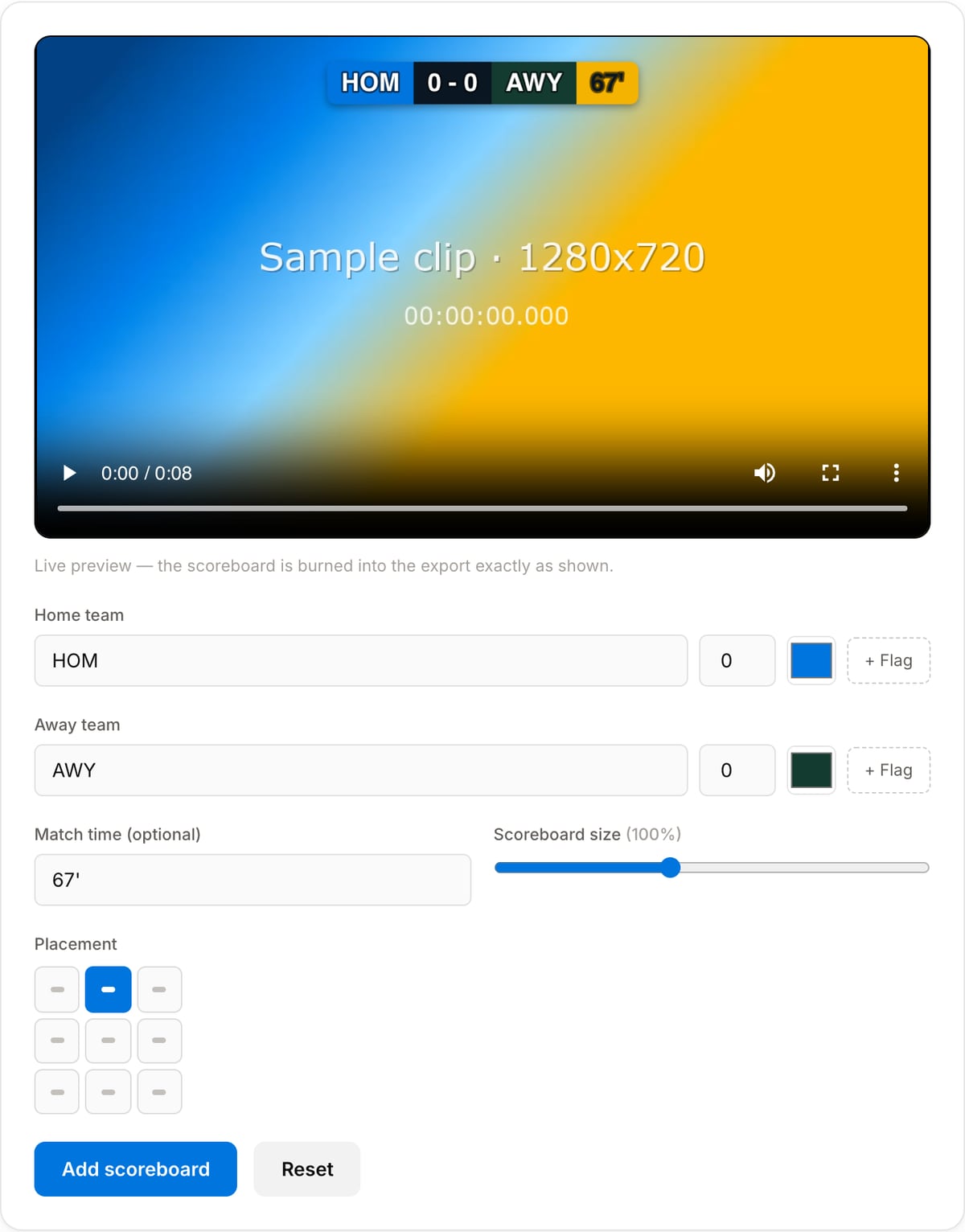
Best for / not for
Best for
- Burning a static football or sports scoreboard — home and away abbreviations, the score, and an optional match timer — onto any clip.
- Watch-party reactions, highlight reels, grassroots match recaps, and social goal clips that need instant scoreline context.
- Quick top-or-bottom overlays where a full broadcast graphics suite would be overkill.
Not for
- Live or animated scoreboards that count up as goals happen — the score and timer are fixed for the whole clip.
- Possession bars, player stats, lower-thirds templates, sponsor tickers, or motion-tracked graphics.
- Non-Latin team names, since the default drawtext font only renders Latin letters and digits reliably.
Best use cases for a scoreboard overlay
- Brand World Cup or Champions League watch-party clips with the live score and team abbreviations before you post the reaction.
- Build highlight reels and goal compilations where every clip carries a clean HOME vs AWAY scoreline.
- Recap 5-a-side, Sunday league, and grassroots matches with a tidy scoreboard so friends and parents can follow the result.
- Tag fantasy, prediction, and bet-recap videos with the final score and an optional match timer to add instant context.
Scoreboard settings that matter
| Team abbreviations | Use 2-4 Latin letters per side (for example ARG vs FRA or LIV vs MCI). Drawn with the drawtext default font, which supports A-Z and 0-9 reliably. |
|---|---|
| Score and match timer | Set a fixed score (such as 2 - 1) and an optional timer or minute (such as 78'). Both stay static for the entire clip — they do not count or tick. |
| Position and color | Place the scoreboard at the top or bottom of the frame with consistent padding, and set the box (drawbox) and text colors to suit your clip or broadcast style. |
| Output and quality | Re-encoded to H.264 MP4 at CRF 23 (visually lossless) with the original audio stream-copied. No watermark, no signup, free for any use. |
Scoreboard Overlay vs. the usual alternatives
| Feature | This tool | VEED (free) | Kapwing (free) | CapCut Online |
|---|---|---|---|---|
| Processing model | Runs locally in your browser | Upload-based project editor | Upload-based project editor | Upload-based online editor |
| File limits | Tool-specific file limits apply; available memory can require smaller files | Free: up to 1 GB per uploaded file | Free: up to 250 MB per uploaded file; exports up to 4 minutes | Limits depend on the feature, account and selected assets |
| Watermark on output | No watermark added | Watermark on free or signed-out exports | Watermark on Free-plan exports | Standard edits can be watermark-free; template branding and Pro assets need checking |
| Signup / account | No account for tools | Workspace/account flow | Workspace/account flow | CapCut account flow |
| Connection | Initial page and processing-engine downloads require internet; offline use is not guaranteed | Online project editor | Online project editor | Online project editor |
| Best for | Private one-step file operations | Full editor, templates, AI tools | Collaboration, templates, AI tools | Social templates and timeline editing |
Comparison covers the web editors and the linked help pages. Plans, export settings and asset restrictions can change; check the source before starting a project.
Checked . Sources: VEED upload limits · VEED watermarks · Kapwing Free plan · CapCut watermarks · CapCut Pro assets
Why use this scoreboard overlay
- 100% private — your match footage never leaves your browser, so nothing is uploaded to a server.
- Free for personal or club use, without signup or an added watermark. File-size and device-memory limits still apply.
- Runs on FFmpeg compiled to WebAssembly, using drawtext and drawbox for the same crisp, professional overlay you would get from the terminal.
- Works on desktop and mobile — only a modern browser is needed, so you can label clips straight from your phone after the final whistle.
Frequently Asked Questions
Can I add team flags or logos, colors, and choose where it sits?
Yes — upload an image for each team and it fills that team's block like a flag behind the abbreviation. You can set each team's color independently and place the scoreboard in any of nine spots (top/middle/bottom × left/center/right).
Is the preview exactly what I get?
Yes. The scoreboard is drawn in your browser onto the video and the same drawing is burned into the export, so the live preview is pixel-for-pixel what you download.
Will non-Latin team names render?
Yes — the scoreboard text is drawn with your system fonts, so Latin, Cyrillic, Greek, and CJK names all render (unlike older overlay tools that were limited to Latin).
Can I animate the score so it changes during the clip?
Not in this tool — the scoreboard shows one fixed score and time for the whole clip. For a goal moment, trim the clip so the displayed score matches that segment, then add a second scoreboard to the next segment if needed.
Does adding a scoreboard reduce quality?
The video is re-encoded once at CRF 23 (visually lossless) and the audio is stream-copied untouched. There is no watermark and nothing is uploaded.
Can I animate the score so it ticks up when a goal goes in?
No. The scoreboard is a static overlay — the score, team abbreviations, and timer you set are drawn onto the whole clip with drawtext and drawbox. For a goal moment, trim the clip at the goal and run it twice with the before and after score, then merge the two pieces.
Does it support non-Latin team names like Greek, Cyrillic, or Arabic abbreviations?
The built-in drawtext default font is tuned for Latin characters (A-Z, 0-9), so 2-4 letter abbreviations such as ARG, FRA, or MUN render perfectly. Non-Latin scripts may show as missing glyphs because the bundled font lacks those characters. Stick to Latin abbreviations for reliable results.
Can I move the scoreboard to the top or bottom of the frame?
Yes. Choose a top or bottom position and the overlay is anchored there with consistent padding, so it sits clear of the action and any platform UI. You can also set the box and text colors to match a broadcast look.
Will the video quality drop after adding the scoreboard?
Quality stays high. Adding the overlay requires re-encoding the video, which is done with H.264 at CRF 23 — a visually lossless setting for sports clips. The audio stream is copied untouched, so commentary and crowd noise are unchanged.